소개
This guide will walk you through the steps and tools required to properly replace the camera's shutter button.
필요한 것
-
-
-
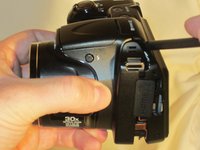
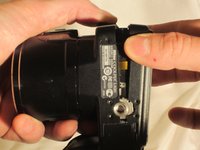
Use a Phillips #0 screwdriver to remove the screws on the front casing. There are 10 screws around the casing. 3 are located on the left side of the camera, 6 are located on the bottom near the product label, and 1 is located on the right side of the camera.
 FixBot에 문의하기
-
-
-
-
Next, remove the screw held on top of the camera above the Nikon logo.
-
Moving to the bottom of the camera, open the empty battery slot, and locate the 4 screws in the compartment. Begin removing the 4 screws located within.
-
-
-
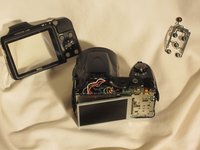
Using the spudger, begin prying the case from the device, carefully separating the rear housing from the camera assembly. Once the rear housing is separated, the camera's physical buttons will be accessible for replacement.
-
-


To reassemble your device, follow these instructions in reverse order.
다른 한 분이 해당 안내서를 완성하였습니다.

팀

UMass Dartmouth, Team 1-4, Miles Spring 2015 UMass Dartmouth, Team 1-4, Miles Spring 2015 회원
UMASSD-MILES-S15S1G4
3 회원들
안내서 10개를 작성함
