주요 콘텐츠로 건너뛰기
수리 커뮤니티 가입 - 계정 만들기

Nikon Coolpix P510 Lens Casing Replacement

필요한 것

  1. Nikon Coolpix P510 Lens Casing Replacement, Lens Assembly: 1 단계, 이미지 2개 중 1개 Nikon Coolpix P510 Lens Casing Replacement, Lens Assembly: 1 단계, 이미지 2개 중 2개
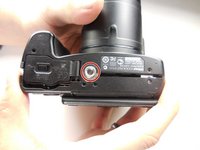
    • Flip the camera upside down and remove six 3mm PH00 Philips screws with a Philips screwdriver.

    • On the thumb grip, remove the one 4mm PH00 Philips screw.

  2. Nikon Coolpix P510 Lens Casing Replacement: 2 단계, 이미지 1개 중 1개
    • With the camera upside down, remove the three 3mm PH00 Philips screws on the left side.

    • One of the screws are under the HDMI and A/V Out cover.

  3. Nikon Coolpix P510 Lens Casing Replacement: 3 단계, 이미지 1개 중 1개
    • On the opposite side of the camera, remove the two 3mm PH00 Philips screws.

  4. Nikon Coolpix P510 Lens Casing Replacement: 4 단계, 이미지 1개 중 1개
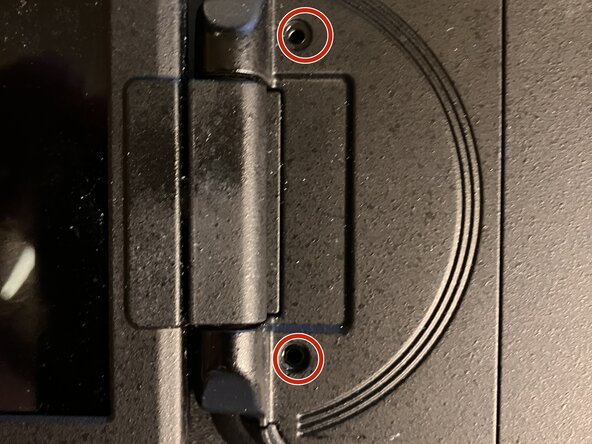
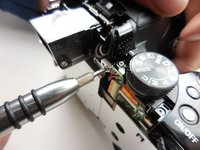
    • open the display and remove the two Ph 00 screws near the hinge

  5. Nikon Coolpix P510 Lens Casing Replacement: 5 단계, 이미지 3개 중 1개 Nikon Coolpix P510 Lens Casing Replacement: 5 단계, 이미지 3개 중 2개 Nikon Coolpix P510 Lens Casing Replacement: 5 단계, 이미지 3개 중 3개
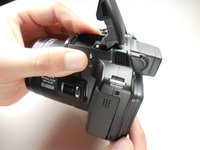
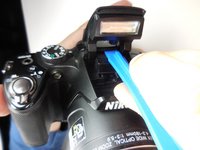
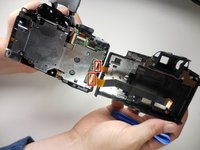
    • Open the flash and use a plastic opening tool to pop the tab under it as shown.

    • Now pull the casing apart.

    • The tripod attachment may fall out on its own, or you will need to pull it out.

  6. Nikon Coolpix P510 Lens Casing Replacement: 6 단계, 이미지 2개 중 1개 Nikon Coolpix P510 Lens Casing Replacement: 6 단계, 이미지 2개 중 2개
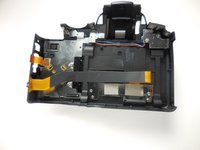
    • Unplug the two ribbon cables to completely detach the back, by securely opening the latch

  7. Nikon Coolpix P510 Lens Casing Replacement: 7 단계, 이미지 3개 중 1개 Nikon Coolpix P510 Lens Casing Replacement: 7 단계, 이미지 3개 중 2개 Nikon Coolpix P510 Lens Casing Replacement: 7 단계, 이미지 3개 중 3개
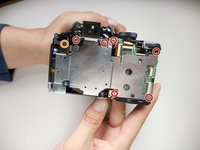
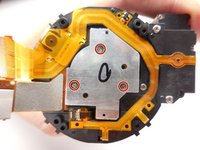
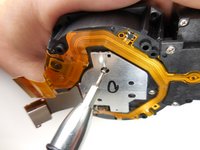
    • With the back separated, you need to remove six 3mm PH000 Philips screws with a Philips screwdriver.

    • Remove one 5mm PH00 Philips screw

    • To remove the top right corner screw, you may need to lift the corner of the case to gain access to it.

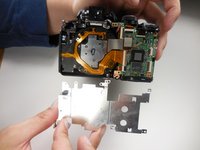
    • With all the screws out, the metal plate should simply lift off.

  8. Nikon Coolpix P510 Lens Casing Replacement: 8 단계, 이미지 2개 중 1개 Nikon Coolpix P510 Lens Casing Replacement: 8 단계, 이미지 2개 중 2개
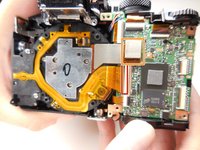
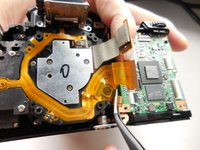
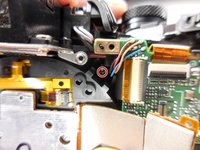
    • With the metal plate off, unplug this ribbon cable from the motherboard.

    • To remove the flat-topped connector, you simply lift it up to unplug it.

  9. Nikon Coolpix P510 Lens Casing Replacement: 9 단계, 이미지 3개 중 1개 Nikon Coolpix P510 Lens Casing Replacement: 9 단계, 이미지 3개 중 2개 Nikon Coolpix P510 Lens Casing Replacement: 9 단계, 이미지 3개 중 3개
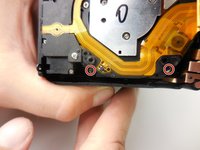
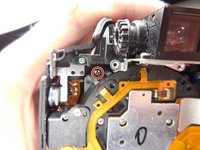
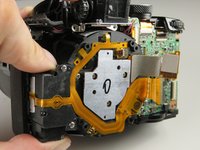
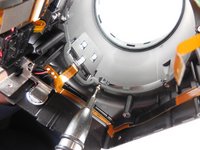
    • To get the lens assembly out, you need to remove four 6mm PH00 Philips screws

  10. Nikon Coolpix P510 Lens Casing Replacement: 10 단계, 이미지 2개 중 1개 Nikon Coolpix P510 Lens Casing Replacement: 10 단계, 이미지 2개 중 2개
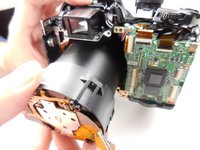
    • With the support screws out, you can simply slide the assembly out of the casing.

  11. Nikon Coolpix P510 Lens Casing Replacement: 11 단계, 이미지 3개 중 1개 Nikon Coolpix P510 Lens Casing Replacement: 11 단계, 이미지 3개 중 2개 Nikon Coolpix P510 Lens Casing Replacement: 11 단계, 이미지 3개 중 3개
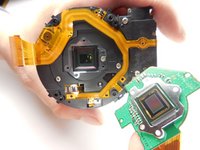
    • If you are moving on to take the lens casing off, you do not need to do this step.

    • With the assembly out we need to take of this last piece by removing the three 3mm PH000 Philips screws.

  12. Nikon Coolpix P510 Lens Casing Replacement, Lens Casing: 12 단계, 이미지 2개 중 1개 Nikon Coolpix P510 Lens Casing Replacement, Lens Casing: 12 단계, 이미지 2개 중 2개
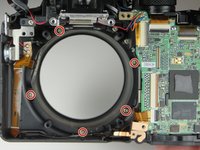
    • Remove the five PH00 screws surrounding the lens.

  13. Nikon Coolpix P510 Lens Casing Replacement: 13 단계, 이미지 1개 중 1개
    • Separate the lens casing from the front.

    • The switch on the side simply slides off of the front casing.

결론

To reassemble your device or to attach a new lense, follow these instructions in reverse order. Take your e-waste to an R2 or e-Stewards certified recycler.

다른 3명이 해당 안내서를 완성하였습니다.

작성자

4다른 기여자 명과 함께

Brian Hulsey

회원 가입일: 03/31/15

1,554 평판

안내서 6개를 작성함

Colorado Springs, Team 2-2, Panko Spring 2015 Colorado Springs, Team 2-2, Panko Spring 2015 회원

UCCS-PANKO-S15S2G2

3 회원들

안내서 15개를 작성함

0가이드 댓글

댓글 쓰기

조회 통계:

지난 24시간: 2

지난 7일: 13

지난 30일: 53

전체 시간: 3,715