주요 콘텐츠로 건너뛰기
수리 커뮤니티 가입 - 계정 만들기

Nikon D70 Memory Compression Board Replacement

필요한 것

    1. Nikon D70 Memory Compression Board Replacement, Battery: 1 단계, 이미지 1개 중 1개
      • Use your finger tip to pull the battery release tab toward the center of the D70.

      • Open the battery door and rotate it away from the bottom cover.

      댓글 쓰기

    2. Nikon D70 Memory Compression Board Replacement: 2 단계, 이미지 1개 중 1개
      • Pull the battery out of the D70.

      • It may be necessary to wiggle the battery while pulling to free it from its pocket in the case.

      댓글 쓰기

    1. Nikon D70 Memory Compression Board Replacement, Bottom Cover: 3 단계, 이미지 1개 중 1개
      • Remove the following eight screws securing the bottom cover to the D70:

      • Six 5.8 mm Phillips screws

      • One 10.7 mm Phillips screws

      • One 8.2 mm Phillips screws

      댓글 쓰기

    2. Nikon D70 Memory Compression Board Replacement: 4 단계, 이미지 2개 중 1개 Nikon D70 Memory Compression Board Replacement: 4 단계, 이미지 2개 중 2개
      • Carefully pull the bottom cover to separate it from the body of the D70.

      • Remove the bottom cover from the D70.

      댓글 쓰기

    1. Nikon D70 Memory Compression Board Replacement, Memory Compression Board: 5 단계, 이미지 3개 중 1개 Nikon D70 Memory Compression Board Replacement, Memory Compression Board: 5 단계, 이미지 3개 중 2개 Nikon D70 Memory Compression Board Replacement, Memory Compression Board: 5 단계, 이미지 3개 중 3개
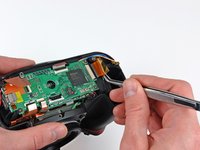
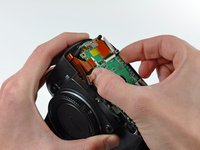
      • Remove the four ZIF ribbon cables highlighted in red by using the following procedure:

      • Use your fingernail to flip up the ZIF cable retaining flap on each socket.

      • Be sure you are prying up the retaining flap, not the socket.

      • Pull the ribbon cable straight out of its socket.

      댓글 쓰기

    2. Nikon D70 Memory Compression Board Replacement: 6 단계, 이미지 1개 중 1개
      • Carefully peel back the piece of tape covering the Compact Flash ribbon cable socket.

      • It is not necessary to completely remove this piece of tape.

      댓글 쓰기

    3. Nikon D70 Memory Compression Board Replacement: 7 단계, 이미지 3개 중 1개 Nikon D70 Memory Compression Board Replacement: 7 단계, 이미지 3개 중 2개 Nikon D70 Memory Compression Board Replacement: 7 단계, 이미지 3개 중 3개
      이 단계에 사용된 도구:
      Tweezers
      $4.99
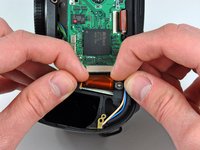
      • Use your fingernails to carefully pull the ZIF cable lock away from its socket.

      • Do not try to completely remove the ZIF cable lock. It will move about 1 mm and stop.

      • Use a pair of tweezers to pull the Compact Flash ribbon cable out of its socket.

      댓글 쓰기

    4. Nikon D70 Memory Compression Board Replacement: 8 단계, 이미지 1개 중 1개
      • Be sure not to lose the small iron core around the DC-In ribbon cable.

      댓글 쓰기

    5. Nikon D70 Memory Compression Board Replacement: 9 단계, 이미지 1개 중 1개
      • Remove the four 4.3 mm Phillips screws securing the memory compression board to the D70.

      댓글 쓰기

    6. Nikon D70 Memory Compression Board Replacement: 10 단계, 이미지 1개 중 1개
      • Use a pair of tweezers to pull the USB connector bracket away from the edge of the memory compression board.

      댓글 쓰기

    7. Nikon D70 Memory Compression Board Replacement: 11 단계, 이미지 2개 중 1개 Nikon D70 Memory Compression Board Replacement: 11 단계, 이미지 2개 중 2개
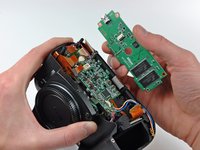
      • Grab the memory compression board by its edges at the position shown in the first picture.

      • Pull the memory compression board straight up off the DC/DC board to avoid damaging the connector on the underside of the memory compression board.

      댓글 쓰기

결론

To reassemble your device, follow these instructions in reverse order.

취소: 해당 안내서를 완성하지 않았습니다.

다른 4명이 해당 안내서를 완성하였습니다.

0가이드 댓글

댓글 쓰기

조회 통계:

지난 24시간: 1

지난 7일: 10

지난 30일: 43

전체 시간: 24,370