소개
배터리에 문제가 있어 교체가 필요한가요? 이 안내서를 따라 하시면 Nintendo 3DS XL의 배터리를 금방 교체할 수 있습니다!
필요한 것
-
-
-
-
플라스틱 여는 도구를 사용하여 뒷면 커버를 고정하고 있는 클립을 윗면 모서리부터 차례대로 들어 올려 분리하세요.
-
손으로 뒷면 커버를 분리하세요.
-

 FixBot에 문의하기


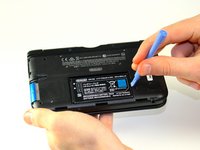
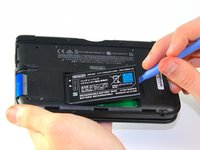
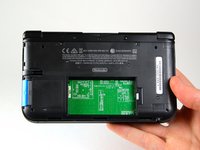
이 단계를 모두 완료하면 새 배터리를 삽입할 수 있습니다.
기기를 재조립하려면 이 지침을 역순으로 따르세요.
다른 63명이 해당 안내서를 완성하였습니다.
다음 번역가들에게 특별히 감사 드립니다:
100%

Translation Bot님은 저희가 세상을 수리하는데 동참하신 분입니다! 기여하시겠습니까?
번역 시작하기 ›

팀

Cal Poly, Team 9-13, Regan Spring 2014 Cal Poly, Team 9-13, Regan Spring 2014 회원
CPSU-REGAN-S14S9G13
5 회원들
안내서 96개를 작성함
6가이드 댓글
Time estimate: 3 - 9 hours Difficulty: Very difficult ??????
More like 30-90 seconds, and that's if you have to search for a screwdriver.
Tommy Lynch - 답글 공유
It should be noted that the bottom three clips on the bottom of the backplate can’t just be snapped in, they need to be slipped in, so when removing the backplate, it should be tiled away from the system and then pulled up from the bottom, and those three clips on the bottom should be the first clips in when you’re putting it back together, sliding them in with the backplate at an angle, and then the rest of the clips just snap in.
Cole Jackson - 답글 공유
Nice tip. Ty.
Just did this. For reasmbly I recommend putting the bottom/lower part of the case on first before you screw it back on.
Scott Vogel - 답글 공유
