주요 콘텐츠로 건너뛰기
수리 커뮤니티 가입 - 계정 만들기

Nintendo DSi Top LCD Screen Replacement

보관된 가이드
해당 안내서는 단지 역사적인 목적으로 보관됩니다. 최신 버전 안내서를 사용하여 수리 하십시오.

필요한 것

  1. 주의: 1-2 단계들은 진행 중으로 표시된 안내서에서 제공되었습니다.

    Nintendo DSi Top LCD Screen Replacement, Battery: 1 단계, 이미지 1개 중 1개
    • Loosen the two screws on the battery panel. Then lift the panel up to remove it.

    댓글 쓰기

  2. Nintendo DSi Top LCD Screen Replacement: 2 단계, 이미지 1개 중 1개
    • L Button.

    • Top of the battery pack.

    • To remove the battery pack, place your fingernail or a spudger at the top of the battery near the L button. Gently lift the battery out.

    댓글 쓰기

  3. 주의: 3-4 단계들은 진행 중으로 표시된 안내서에서 제공되었습니다.

    Nintendo DSi Top LCD Screen Replacement, Motherboard: 3 단계, 이미지 2개 중 1개 Nintendo DSi Top LCD Screen Replacement, Motherboard: 3 단계, 이미지 2개 중 2개
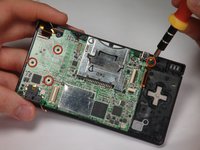
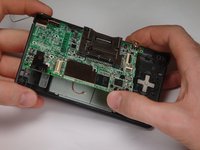
    • Remove 4 Phillips screws from the board.

    • Lift the main board from the bottom end and flip it over to reveal the last connector.

    • Keep the main board fairly close to the case, making sure not to damage the last ribbon cable holding it in place.

    댓글 쓰기

  4. Nintendo DSi Top LCD Screen Replacement: 4 단계, 이미지 1개 중 1개
    • Disconnect the ribbon cable by gently using a plastic opening tool to flip up the black connector latch. The cable should easily slide out from the connector.

    • The motherboard should now be free from the rest of the device.

    댓글 쓰기

  5. Nintendo DSi Top LCD Screen Replacement, Bottom Case: 5 단계, 이미지 1개 중 1개
    • Remove the rubber front-panel button membranes from the device. Pay careful attention to where the buttons go, so you can replace them correctly.

    • A/B/X/Y button assembly

    • Select/Start button assembly

    • D-pad

    • Power button

    댓글 쓰기

  6. Nintendo DSi Top LCD Screen Replacement: 6 단계, 이미지 2개 중 1개 Nintendo DSi Top LCD Screen Replacement: 6 단계, 이미지 2개 중 2개
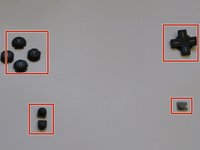
    • Remove the plastic buttons and keep them in a safe place.

    • All of the buttons have "key" notches to prevent them from being inserted incorrectly (backwards or in the wrong place), but it can take a while to figure out where everything goes if they get shuffled around.

    댓글 쓰기

  7. Nintendo DSi Top LCD Screen Replacement: 7 단계, 이미지 2개 중 1개 Nintendo DSi Top LCD Screen Replacement: 7 단계, 이미지 2개 중 2개
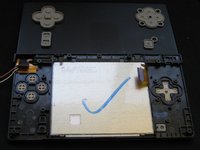
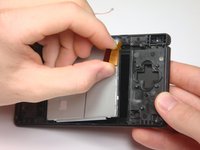
    • Flip the case open, and push the lower screen assembly out of the frame.

    댓글 쓰기

  8. Nintendo DSi Top LCD Screen Replacement, Top LCD Screen: 8 단계, 이미지 1개 중 1개
    • To make the repair easier, we recommend removing the bottom LCD screen prior to replacing the top LCD screen.

    • Using a spudger, or similar tool, pry out the 4 square screw covers.

    댓글 쓰기

  9. Nintendo DSi Top LCD Screen Replacement: 9 단계, 이미지 1개 중 1개
    • Remove 4 Phillips screws with a #00 Phillips screwdriver.

    댓글 쓰기

  10. Nintendo DSi Top LCD Screen Replacement: 10 단계, 이미지 1개 중 1개
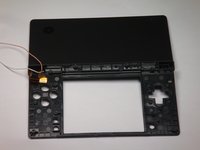
    • Place a plastic opening tool between the front panel and top edge of the outer case. Slide the tool along the edge as needed to prop open the case.

    • With the screen facing you, slide the screen side down with your thumbs to separate the screen from the cover.

    댓글 쓰기

  11. Nintendo DSi Top LCD Screen Replacement: 11 단계, 이미지 1개 중 1개
    • Remove the antenna from the bottom left of the device.

    • Remove the microphone from the top of the frame.

    댓글 쓰기

  12. Nintendo DSi Top LCD Screen Replacement: 12 단계, 이미지 1개 중 1개
    • Use a spudger to pry the camera out of its place.

    댓글 쓰기

  13. Nintendo DSi Top LCD Screen Replacement: 13 단계, 이미지 1개 중 1개
    • Cables for the components in the upper half of the device run through the hinge, which must be carefully disassembled before continuing.

    • Start by pushing the sliding shaft in the hinge on the opposite side of the wires/ribbons.

    댓글 쓰기

  14. Nintendo DSi Top LCD Screen Replacement: 14 단계, 이미지 1개 중 1개
    • On the reverse side of the casing, insert the spudger onto the surface of the sliding shaft just left of the LED light channels.

    • Push the sliding shaft completely through the hinge until it stops and the hinge is released.

    댓글 쓰기

  15. Nintendo DSi Top LCD Screen Replacement: 15 단계, 이미지 1개 중 1개
    • The right side of bottom case should separate from the top case when you remove the sliding shaft.

    • Do not pull up too far or the wire hinge may be damaged.

    • Slide the top case to the right to separate the joint.

    • Weave the wires and ribbons through the wire hinge to completely separate the top and bottom casings.

    댓글 쓰기

  16. Nintendo DSi Top LCD Screen Replacement: 16 단계, 이미지 2개 중 1개 Nintendo DSi Top LCD Screen Replacement: 16 단계, 이미지 2개 중 2개
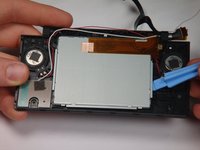
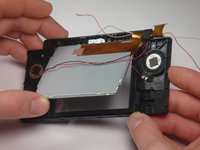
    • The speakers are soldered to the ribbon cable attached to the upper LCD, so they must be removed at the same time as the LCD.

    • Lift the top LCD out of the plastic frame. Carefully thread the ribbon cable out of the hinge to avoid damaging it.

    댓글 쓰기

  17. Nintendo DSi Top LCD Screen Replacement: 17 단계, 이미지 1개 중 1개
    • To remove the speakers, use a spudger or a similar tool to gently pry them off.

    댓글 쓰기

결론

To reassemble your device, follow these instructions in reverse order.

취소: 해당 안내서를 완성하지 않았습니다.

다른 한 분이 해당 안내서를 완성하였습니다.

작성자

18다른 기여자 명과 함께

rjcamero

회원 가입일: 11/05/09

56 평판

안내서 3개를 작성함

Cal Poly, Team 6-1, Maness Fall 2009 Cal Poly, Team 6-1, Maness Fall 2009 회원

CPSU-MANESS-F09S6G1

5 회원들

안내서 4개를 작성함

0가이드 댓글

댓글 쓰기

조회 통계:

지난 24시간: 24

지난 7일: 180

지난 30일: 729

전체 시간: 43,058