주요 콘텐츠로 건너뛰기
수리 커뮤니티 가입 - 계정 만들기

Nintendo Wii Fan Replacement

필요한 것

  1. Nintendo Wii Fan Replacement, Faceplate: 1 단계, 이미지 2개 중 1개 Nintendo Wii Fan Replacement, Faceplate: 1 단계, 이미지 2개 중 2개
    • Use a metal spudger to remove the white plastic screw covers stuck to the lower case near the front of the Wii.

    댓글 쓰기

  2. Nintendo Wii Fan Replacement: 2 단계, 이미지 1개 중 1개
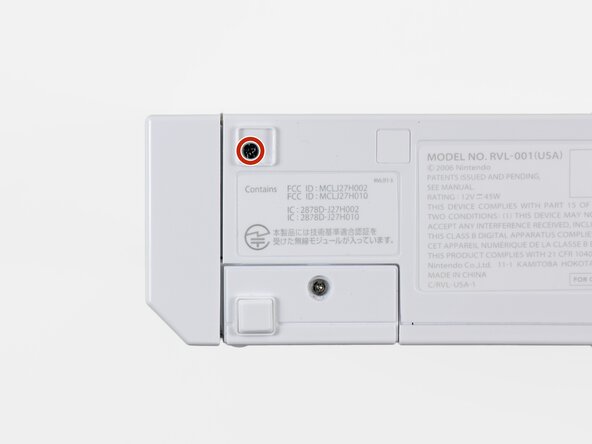
    • Remove the two 8.3 mm Tri-Point screws hidden under the covers you just removed.

    댓글 쓰기

  3. Nintendo Wii Fan Replacement: 3 단계, 이미지 1개 중 1개
    • Remove the single 5.9 mm Phillips screw under the controller port door nearest the faceplate.

    댓글 쓰기

  4. Nintendo Wii Fan Replacement: 4 단계, 이미지 1개 중 1개
    • Use a metal spudger to remove the rubber foot stuck to the side of the Wii near the DVD drive opening.

    댓글 쓰기

  5. Nintendo Wii Fan Replacement: 5 단계, 이미지 1개 중 1개
    • Remove the single 5.9 mm Phillips screw hidden under the foot you just removed.

    댓글 쓰기

  6. Nintendo Wii Fan Replacement: 6 단계, 이미지 2개 중 1개 Nintendo Wii Fan Replacement: 6 단계, 이미지 2개 중 2개
    이 단계에 사용된 도구:
    Tweezers
    $4.99
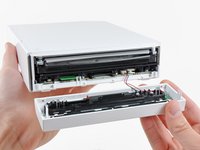
    • Carefully pull the faceplate away from the front of the Wii.

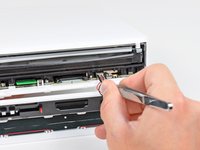
    • Use a pair of tweezers to disconnect the LED cable's plastic connector from the motherboard.

    • Remove the faceplate.

    댓글 쓰기

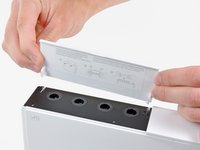
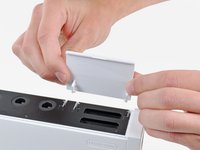
  7. Nintendo Wii Fan Replacement, Outer Case: 7 단계, 이미지 3개 중 1개 Nintendo Wii Fan Replacement, Outer Case: 7 단계, 이미지 3개 중 2개 Nintendo Wii Fan Replacement, Outer Case: 7 단계, 이미지 3개 중 3개
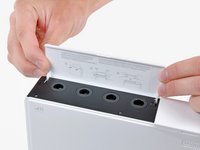
    • Open the controller port cover until it is perpendicular to the black controller port bezel.

    • Pull the controller port cover straight up to release it from the outer case.

    • Repeat this procedure for the memory card port cover.

    댓글 쓰기

  8. Nintendo Wii Fan Replacement: 8 단계, 이미지 2개 중 1개 Nintendo Wii Fan Replacement: 8 단계, 이미지 2개 중 2개
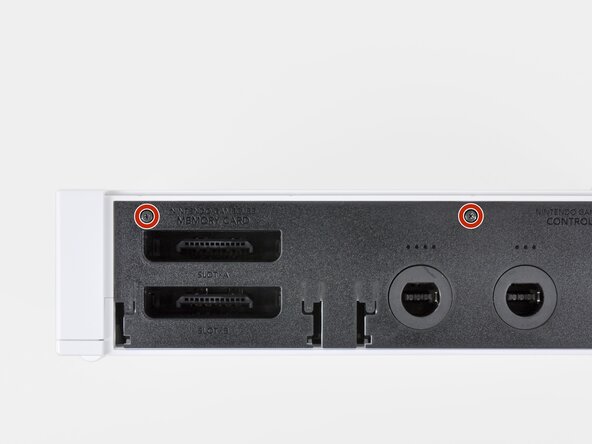
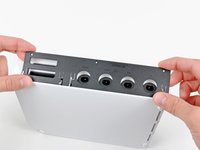
    • Remove the two remaining 4.1 mm Phillips screws along the top edge of the black plastic controller port bezel.

    • Lift the bezel from the long edge furthest away from the controller ports and remove it from the Wii.

    댓글 쓰기

  9. Nintendo Wii Fan Replacement: 9 단계, 이미지 1개 중 1개
    • Remove the two 5 mm Phillips screws above the controller ports.

    댓글 쓰기

  10. Nintendo Wii Fan Replacement: 10 단계, 이미지 1개 중 1개
    • Use a metal spudger to remove the three highlighted screw covers stuck to the side of the Wii.

    댓글 쓰기

  11. Nintendo Wii Fan Replacement: 11 단계, 이미지 1개 중 1개
    • Remove the following screws:

    • Two 5 mm Phillips screws

    • One 8.2 mm Tri-Point screw

    댓글 쓰기

  12. Nintendo Wii Fan Replacement: 12 단계, 이미지 1개 중 1개
    • Use a metal spudger to remove the two rubber feet stuck to the bottom face of the Wii near the rear ports.

    댓글 쓰기

  13. Nintendo Wii Fan Replacement: 13 단계, 이미지 1개 중 1개
    이 단계에 사용된 도구:
    iFixit Precision 4 mm Screwdriver Bit
    $2.99
    • Remove the two 8.2 mm Tri-Point screws hidden under the feet you just removed.

    • You may use a 4 mm hex nut driver to extend your bit into the recesses and reach the screws.

    댓글 쓰기

  14. Nintendo Wii Fan Replacement: 14 단계, 이미지 1개 중 1개
    • Lift the outer case straight up off the body of the Wii.

    댓글 쓰기

  15. Nintendo Wii Fan Replacement, Fan: 15 단계, 이미지 1개 중 1개
    이 단계에 사용된 도구:
    Tweezers
    $4.99
    • Grab the fan connector with a pair of tweezers and lift it straight up and out of its socket on the motherboard.

    • Be sure your tweezers are clamped down on the fan connector, not the socket attached to the motherboard.

    댓글 쓰기

  16. Nintendo Wii Fan Replacement: 16 단계, 이미지 1개 중 1개
    • Remove the two 10 mm Phillips screws securing the fan to the fan shroud.

    댓글 쓰기

  17. Nintendo Wii Fan Replacement: 17 단계, 이미지 1개 중 1개
    • Remove the fan from the Wii.

    댓글 쓰기

결론

To reassemble your device, follow these instructions in reverse order.

취소: 해당 안내서를 완성하지 않았습니다.

다른 36명이 해당 안내서를 완성하였습니다.

10가이드 댓글

Awesome guide, just replaced faulty fan unit in my 9 year old wii. Should hopefully keep it going for another 9 years :)

Finlay Macrae - 답글 공유

Super easy and great instructions! I feel a little guilty that my Wii sat in the garage for 4 years! Now it'll be a great birthday present for my 2 boys.

e_gayheart - 답글 공유

Does anyone have a diagram for the Wii’s airflow? I’m looking to install a booster fan at the bottom to help blow air in but I want to make sure it is effective.

Jessica Parnelli Fawkes - 답글 공유

nice¡¡¡¡¡¡¡¡¡¡¡¡¡¡

RIGO NOLASCO - 답글 공유

Thanks! Wii Quarantine’n in 2021!

Daniel Thomas - 답글 공유

댓글 쓰기

조회 통계:

지난 24시간: 8

지난 7일: 86

지난 30일: 323

전체 시간: 50,736