소개
If your buttons are sticky, the numbers are worn off, or the keypad is malfunctioning, simply clean or replace it.
필요한 것
-
-
Be sure cell phone is off before you begin to disassemble the phone.
-
Press the button on the bottom of the back of the cell phone.
-
Slide rear panel down and remove it.
 FixBot에 문의하기
-
-
-
-
Insert the plastic opening tool under the faceplate.
-
Separate the faceplate from main body by twisting the prying tool with some force.
-
The faceplate is held by three plastic fasteners, so pry evenly on both sides of phone.
-
-
-
With the faceplate removed, simply peel off rubber key pad and remove.
-


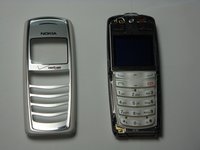
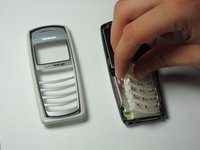
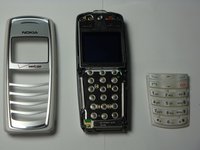
To reassemble your device, follow these instructions in reverse order.

팀

Cal Poly, Team 20-8, Maness Fall 2010 Cal Poly, Team 20-8, Maness Fall 2010 회원
CPSU-MANESS-F10S20G8
4 회원들
안내서 48개를 작성함
