소개
If you have cracked or damaged your screen, this guide will provide you with a step by step instructions on how to take the device apart to access it.
필요한 것
-
-
Using the thumbtab molded on the bottom of the phone, pry the back cover off using either a fingernail or a plastic opening tool.
 FixBot에 문의하기
-
-
-
There is a molded notch in the white frame of the phone near the top right of the battery. Using either a finger or a plastic opening tool, utilize the notch to lift up on the battery, and remove it from the device.
-
-
-
-
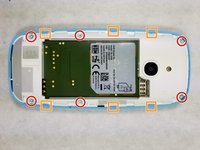
Using a T5 screwdriver bit, remove the (6) 5.0 mm screws along the outside edge of the frame.
-
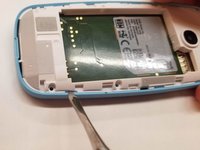
Using a metal spudger, wedge the 6 plastic tabs molded into the outer shell away from the frame to lift up and remove it.
-
-
-
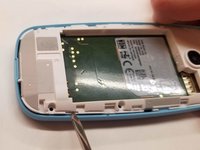
Use a spudger to simultaneously leverage the shell away and the motherboard up from the body of the shell.
-
-
-
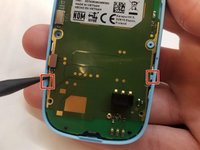
With the motherboard removed, the only thing holding the screen into place is the snap plug on the back of the motherboard.
-
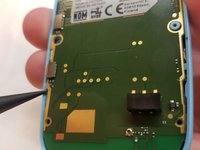
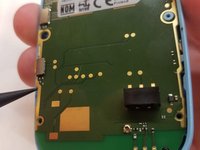
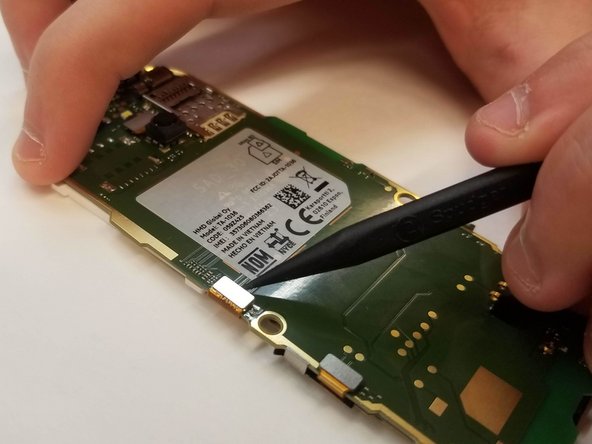
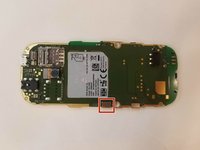
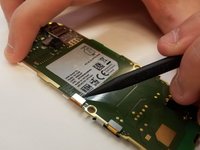
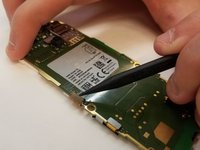
Using a spudger, leverage the top snap up to disconnect it (photo shows motherboard rotated 90 degrees counterclockwise).
-






To reassemble your device, follow these instructions in reverse order.
다른 6명이 해당 안내서를 완성하였습니다.

팀

UMass Dartmouth, Team S3-G3, Peak Fall 2018 UMass Dartmouth, Team S3-G3, Peak Fall 2018 회원
UMASSD-PEAK-F18S3G3
3 회원들
안내서 32개를 작성함
