주요 콘텐츠로 건너뛰기
수리 커뮤니티 가입 - 계정 만들기

Nokia 6010 Microphone Replacement

필요한 것

  1. Nokia 6010 Microphone Replacement, Battery: 1 단계, 이미지 3개 중 1개 Nokia 6010 Microphone Replacement, Battery: 1 단계, 이미지 3개 중 2개 Nokia 6010 Microphone Replacement, Battery: 1 단계, 이미지 3개 중 3개
    • Press the small tab on the bottom of the back of the phone.

    • Push the back case upward towards the power button. The back case will then pop off.

    • It requires some force, so be careful.

  2. Nokia 6010 Microphone Replacement: 2 단계, 이미지 2개 중 1개 Nokia 6010 Microphone Replacement: 2 단계, 이미지 2개 중 2개
    • Lift the battery near the bottom and pry up.

  3. Nokia 6010 Microphone Replacement, SIM Card: 3 단계, 이미지 1개 중 1개
    • With one hand, press the ridged tab near the visible side of the SIM card.

    • Slide the card out with your other hand.

  4. Nokia 6010 Microphone Replacement, Keypad: 4 단계, 이미지 2개 중 1개 Nokia 6010 Microphone Replacement, Keypad: 4 단계, 이미지 2개 중 2개
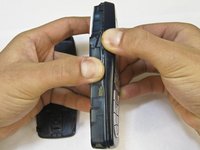
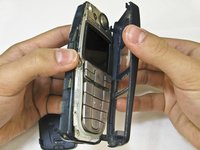
    • Grip the phone on either the sides, the top, or the bottom.

    • Pull the front case away from the rest of the phone.

    • There are no special tabs to keep it in place so it should wiggle free easily.

  5. Nokia 6010 Microphone Replacement: 5 단계, 이미지 1개 중 1개
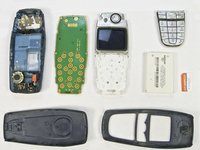
    • Lift the keypad away from the body of the phone.

    • The keypad is the rubber-backed piece with the number keys.

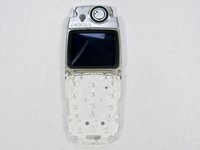
  6. Nokia 6010 Microphone Replacement, LCD Screen and Speaker: 6 단계, 이미지 2개 중 1개 Nokia 6010 Microphone Replacement, LCD Screen and Speaker: 6 단계, 이미지 2개 중 2개
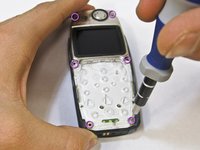
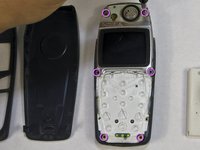
    • Remove the six screws around the front of the phone body with a T6 screwdriver.

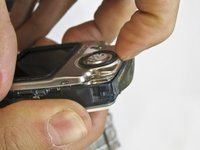
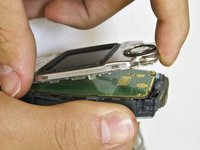
  7. Nokia 6010 Microphone Replacement: 7 단계, 이미지 3개 중 1개 Nokia 6010 Microphone Replacement: 7 단계, 이미지 3개 중 2개 Nokia 6010 Microphone Replacement: 7 단계, 이미지 3개 중 3개
    • Insert your finger underneath the speaker piece and pry away from the phone body.

    • The plastic layer containing the LCD screen and speaker takes some force to remove.

    • There are 4 plastic tabs which keep it in place, but they are hard to press. Be careful and go tab by tab or use a spudger if you are nervous about using too much force.

    • The LCD and the speaker are attached to the same piece and must be replaced together.

  8. Nokia 6010 Microphone Replacement, Logic Board: 8 단계, 이미지 2개 중 1개 Nokia 6010 Microphone Replacement, Logic Board: 8 단계, 이미지 2개 중 2개
    • Slide the rubber power button away from the body of the phone.

    • The power button is the rubber piece on the top of the phone.

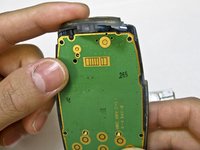
  9. Nokia 6010 Microphone Replacement: 9 단계, 이미지 3개 중 1개 Nokia 6010 Microphone Replacement: 9 단계, 이미지 3개 중 2개 Nokia 6010 Microphone Replacement: 9 단계, 이미지 3개 중 3개
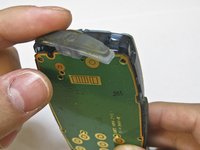
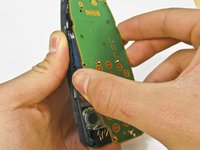
    • Insert a finger between the phone body and logic board.

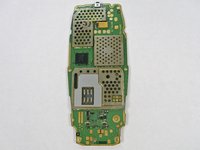
    • The logic board is the green plastic piece with circuitry attached.

    • Pull the board away gently.

    • The board is delicate and contains electronic parts. Be careful while removing it.

  10. Nokia 6010 Microphone Replacement, Microphone: 10 단계, 이미지 3개 중 1개 Nokia 6010 Microphone Replacement, Microphone: 10 단계, 이미지 3개 중 2개 Nokia 6010 Microphone Replacement, Microphone: 10 단계, 이미지 3개 중 3개
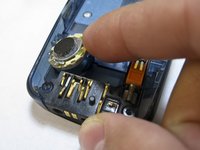
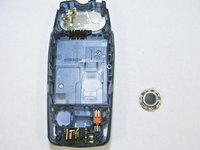
    • Use a spudger or a finger to lift the the microphone off the body of the phone.

    • The microphone is attached to the phone with glue, but removes easily with a spudger.

결론

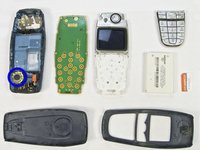
To reassemble your device, follow these instructions in reverse order.

다른 2명이 해당 안내서를 완성하였습니다.

작성자

3다른 기여자 명과 함께

Nicholas Hanne

회원 가입일: 01/20/10

129 평판

안내서 8개를 작성함

Cal Poly, Team 14-45, Regan Winter 2010 Cal Poly, Team 14-45, Regan Winter 2010 회원

CPSU-REGAN-W10S14G45

5 회원들

안내서 16개를 작성함

0가이드 댓글

댓글 쓰기

조회 통계:

지난 24시간: 1

지난 7일: 3

지난 30일: 12

전체 시간: 2,840