주요 콘텐츠로 건너뛰기
수리 커뮤니티 가입 - 계정 만들기

Novatel MiFi 2200 Antenna Replacement

필요한 것

    1. Novatel MiFi 2200 Antenna Replacement, Battery: 1 단계, 이미지 1개 중 1개
      • Remove the rear cover by pressing down on the cover and pulling it away from the device.

      댓글 쓰기

    2. Novatel MiFi 2200 Antenna Replacement: 2 단계, 이미지 1개 중 1개
      • Place your finger on the back of the battery located near the edge of the device.

      • Push your finger into the battery and lift up to pop the battery out of the device.

      댓글 쓰기

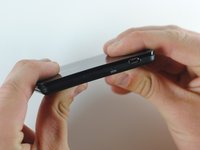
    1. Novatel MiFi 2200 Antenna Replacement, Case: 3 단계, 이미지 1개 중 1개
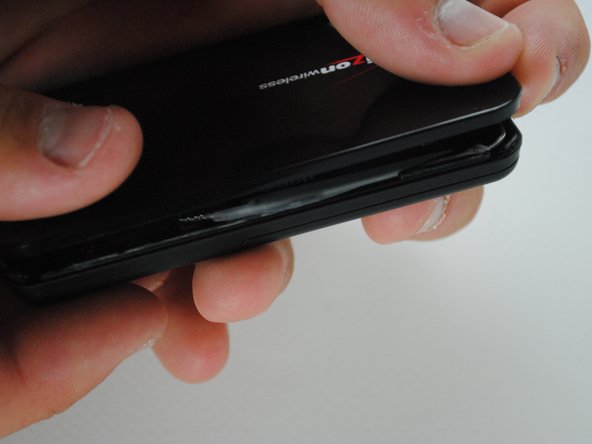
      • Using a metal spudger, pry open the device around the seam between the front and back cover.

      • It may be difficult to split apart, so use force with caution.

      • It may seem like you are breaking the device, but you will only be breaking the adhesive lining that keeps the device sealed.

      댓글 쓰기

    2. Novatel MiFi 2200 Antenna Replacement: 4 단계, 이미지 1개 중 1개
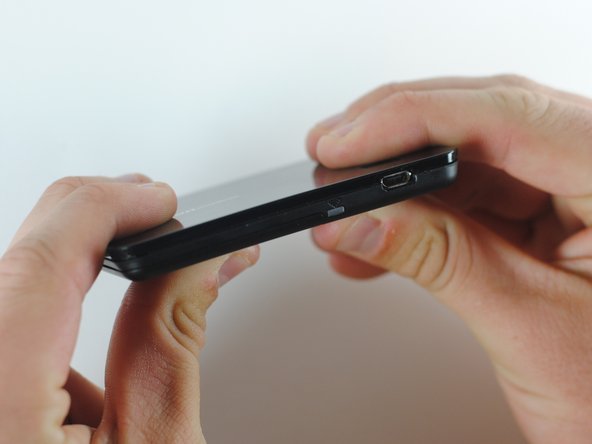
      • Once the seal has been broken all the way around, open the cases using your hands.

      댓글 쓰기

    1. Novatel MiFi 2200 Antenna Replacement, Antenna: 5 단계, 이미지 1개 중 1개
      • To disconnect the antenna, pull up on the antenna's connection to the circuit board until it pops off.

      댓글 쓰기

    2. Novatel MiFi 2200 Antenna Replacement: 6 단계, 이미지 1개 중 1개
      • Carefully pull out the antenna along the edge of the device.

      • There is adhesive applied to the antenna, so it may not easily detach.

      댓글 쓰기

    3. Novatel MiFi 2200 Antenna Replacement: 7 단계, 이미지 1개 중 1개
      • Reconnect your new antenna to the circuit board in the same position described in step 3.

      댓글 쓰기

    4. Novatel MiFi 2200 Antenna Replacement: 8 단계, 이미지 1개 중 1개
      • Re-lay antenna around the edge and over the adhesive.

      • The antenna can be fitted back into several small recesses along the groove that it was originally inside.

      댓글 쓰기

    5. Novatel MiFi 2200 Antenna Replacement: 9 단계, 이미지 3개 중 1개 Novatel MiFi 2200 Antenna Replacement: 9 단계, 이미지 3개 중 2개 Novatel MiFi 2200 Antenna Replacement: 9 단계, 이미지 3개 중 3개
      • Apply double-sided stick tape to the inner top and bottom halves of the device along the seam that was previously unsealed.

      • Snap the two halves together along the adhesive line to reconnect it as it previously was.

      댓글 쓰기

결론

With a new antenna, your device should be transmitting a signal as expected. Keep in mind that you will need adhesive tape to keep the device firmly together.

취소: 해당 안내서를 완성하지 않았습니다.

작성자

7다른 기여자 명과 함께

Carissah

회원 가입일: 04/15/12

147 평판

안내서 2개를 작성함

Cal Poly, Team 7-36, Maness Spring 2012 Cal Poly, Team 7-36, Maness Spring 2012 회원

CPSU-MANESS-S12S7G36

5 회원들

안내서 5개를 작성함

0가이드 댓글

댓글 쓰기

조회 통계:

지난 24시간: 0

지난 7일: 12

지난 30일: 41

전체 시간: 822