소개
The case of any device is always the first line of defense against any kind of external damage. The Shield Tablet in particular is known to be susceptible to casing cracks, specifically at the corners. This guide will show you the step-by-step instructions required to replace your cracked case.
필요한 것
-
-
이 단계에 사용된 도구:Anti-Static Wrist Strap$7.95
-
Set the tablet so the buttons, microSD, and stylus port are facing you.
-
Open the microSD slot.
-
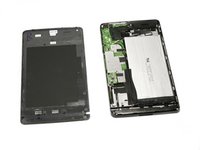
Using the flat end of the spudger tool, carefully pry open the case starting from the microSD slot, slowly sliding the spudger along the inside edge of the case.
-
-
-
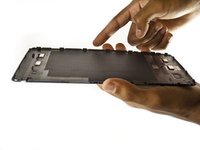
As you remove your case, be aware of small clips along the edges.
-
Finally, set the old casing aside.
-


 FixBot에 문의하기


To reassemble your device, follow these instructions in reverse order.
다른 5명이 해당 안내서를 완성하였습니다.

팀

USF Tampa, Team 2-2, Blackwell Fall 2015 USF Tampa, Team 2-2, Blackwell Fall 2015 회원
USFT-BLACKWELL-F15S2G2
3 회원들
안내서 11개를 작성함
1가이드 댓글
I snapped the cable of the dabbler on the rear case coz i didnt know there was one!
Anyone knows where can i get a new one?
