주요 콘텐츠로 건너뛰기
수리 커뮤니티 가입 - 계정 만들기

Olympus D590 Motherboard Replacement

필요한 것

    1. Olympus D590 Motherboard Replacement, Face Plate: 1 단계, 이미지 1개 중 1개
      • Remove five baseplate screws using a Phillips #00 screwdriver.

      댓글 쓰기

    2. Olympus D590 Motherboard Replacement: 2 단계, 이미지 1개 중 1개
      이 단계에 사용된 도구:
      Tweezers
      $4.99
      • Press and slide the battery cover retainer clip to the left. Use tweezers to lift the battery cover away.

      댓글 쓰기

    3. Olympus D590 Motherboard Replacement: 3 단계, 이미지 1개 중 1개
      • Remove the single screw from the battery housing using a Phillips #00 screwdriver.

      댓글 쓰기

    4. Olympus D590 Motherboard Replacement: 4 단계, 이미지 1개 중 1개
      • Using tweezers, lift the rubber plate to expose the ports.

      댓글 쓰기

    5. Olympus D590 Motherboard Replacement: 5 단계, 이미지 1개 중 1개
      • Remove two screws from the ports using a Phillips #00 screwdriver.

      댓글 쓰기

    6. Olympus D590 Motherboard Replacement: 6 단계, 이미지 1개 중 1개
      • Use a spudger to pry the faceplate away from the rest of the camera.

      댓글 쓰기

    7. Olympus D590 Motherboard Replacement: 7 단계, 이미지 1개 중 1개
      • To avoid disconnection of the connector line to the motherboard, use caution when pulling faceplate away from camera case.

      • Damage to the connector line will prevent the on/off power switch's operational function.

      댓글 쓰기

    1. Olympus D590 Motherboard Replacement, Motherboard: 8 단계, 이미지 1개 중 1개
      • Remove four screws holding the motherboard to the internal housing component using a Phillips #1 screwdriver.

      댓글 쓰기

    2. Olympus D590 Motherboard Replacement: 9 단계, 이미지 1개 중 1개
      • Be cautious of the wires attached to the motherboard.

      • Remove the motherboard from the internal housing component.

      • Do not completely lift the motherboard out with the wiring connected. The wires must be disconnected before proceeding. The next step will demonstrate disconnection process.

      댓글 쓰기

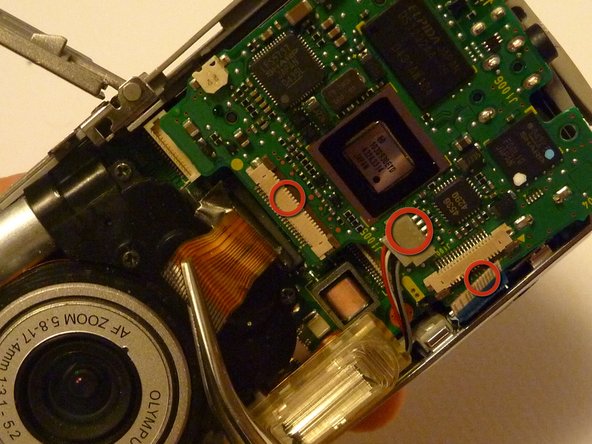
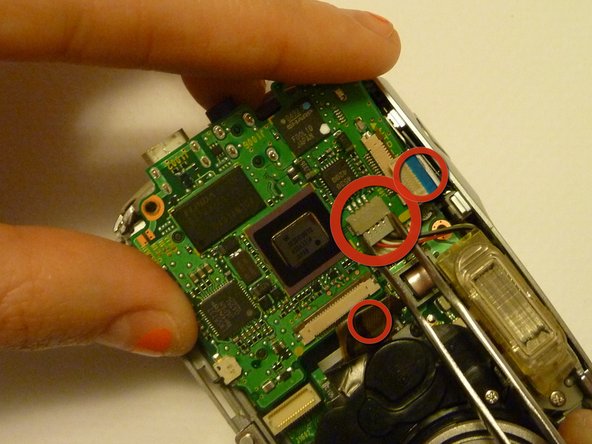
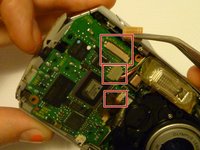
    3. Olympus D590 Motherboard Replacement: 10 단계, 이미지 3개 중 1개 Olympus D590 Motherboard Replacement: 10 단계, 이미지 3개 중 2개 Olympus D590 Motherboard Replacement: 10 단계, 이미지 3개 중 3개
      이 단계에 사용된 도구:
      Tweezers
      $4.99
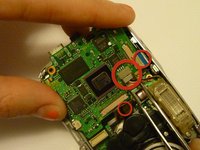
      • Use rounded tweezers to disconnect the three wiring strips from the motherboard.

      • Using sharp tweezers may tear wiring tape and wires.

      • Use gentle force when wiggling or pulling wiring tape and wires to disconnect from the motherboard.

      댓글 쓰기

결론

To reassemble your device, follow these instructions in reverse order.

취소: 해당 안내서를 완성하지 않았습니다.

다른 2명이 해당 안내서를 완성하였습니다.

작성자

9다른 기여자 명과 함께

Sara

회원 가입일: 04/15/10

84 평판

안내서 2개를 작성함

Cal Poly, Team 28-23, Regan Spring 2010 Cal Poly, Team 28-23, Regan Spring 2010 회원

CPSU-REGAN-S10S28G23

4 회원들

안내서 26개를 작성함

0가이드 댓글

댓글 쓰기

조회 통계:

지난 24시간: 1

지난 7일: 7

지난 30일: 37

전체 시간: 2,261