주요 콘텐츠로 건너뛰기
수리 커뮤니티 가입 - 계정 만들기

Oregon Scientific Meep! X2 Microphone Replacement

필요한 것

  1. Oregon Scientific Meep! X2 Microphone Replacement, Rear Casing: 1 단계, 이미지 1개 중 1개
    • Remove the orange covers from the left and right sides of the device by sliding up against the tabs.

  2. Oregon Scientific Meep! X2 Microphone Replacement: 2 단계, 이미지 3개 중 1개 Oregon Scientific Meep! X2 Microphone Replacement: 2 단계, 이미지 3개 중 2개 Oregon Scientific Meep! X2 Microphone Replacement: 2 단계, 이미지 3개 중 3개
    • You can remove the rear casing by unscrewing all six phillips #00(3.5mm x 4.5mm)screws from the left and right side of the device.

  3. Oregon Scientific Meep! X2 Microphone Replacement: 3 단계, 이미지 3개 중 1개 Oregon Scientific Meep! X2 Microphone Replacement: 3 단계, 이미지 3개 중 2개 Oregon Scientific Meep! X2 Microphone Replacement: 3 단계, 이미지 3개 중 3개
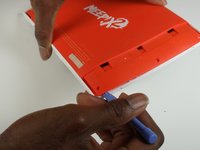
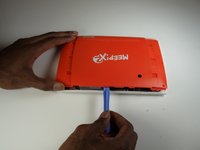
    • Use the plastic opening tools to undo the clips around the edges of the device.

  4. Oregon Scientific Meep! X2 Microphone Replacement, Microphone: 4 단계, 이미지 2개 중 1개 Oregon Scientific Meep! X2 Microphone Replacement, Microphone: 4 단계, 이미지 2개 중 2개
    이 단계에 사용된 도구:
    Tweezers
    $4.99
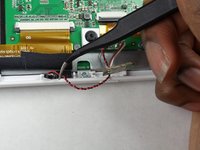
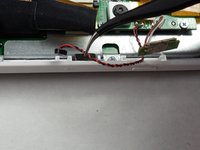
    • Use your tweezers to gently remove the microphone from the slot in the casing.

  5. Oregon Scientific Meep! X2 Microphone Replacement: 5 단계, 이미지 2개 중 1개 Oregon Scientific Meep! X2 Microphone Replacement: 5 단계, 이미지 2개 중 2개
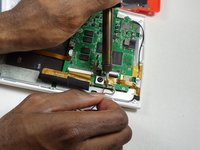
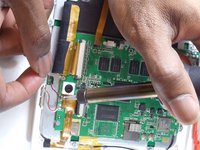
    • Unsolder the microphone unit from the motherboard using the soldering station.

    • In the case of screen or screen sensor replacement, disregard desoldering steps.

결론

To reassemble your device, follow these instructions in reverse order.

작성자

3다른 기여자 명과 함께

J'mel Henneman

회원 가입일: 01/20/15

864 평판

안내서 8개를 작성함

USF Tampa, Team 9-1, Blackwell Winter 2015 USF Tampa, Team 9-1, Blackwell Winter 2015 회원

USFT-BLACKWELL-W15S9G1

3 회원들

안내서 16개를 작성함

0가이드 댓글

댓글 쓰기

조회 통계:

지난 24시간: 4

지난 7일: 14

지난 30일: 46

전체 시간: 388