주요 콘텐츠로 건너뛰기
수리 커뮤니티 가입 - 계정 만들기

Palm Treo 700P Keypad Replacement

필요한 것

  1. Palm Treo 700P Keypad Replacement, Battery: 1 단계, 이미지 3개 중 1개 Palm Treo 700P Keypad Replacement, Battery: 1 단계, 이미지 3개 중 2개 Palm Treo 700P Keypad Replacement, Battery: 1 단계, 이미지 3개 중 3개
    • Press the button located just above the Sprint™ logo and then slide the cover down.

  2. Palm Treo 700P Keypad Replacement: 2 단계, 이미지 2개 중 1개 Palm Treo 700P Keypad Replacement: 2 단계, 이미지 2개 중 2개
    • Use the small notch on the left hand side of the phone to remove the battery.

  3. Palm Treo 700P Keypad Replacement, Back Case: 3 단계, 이미지 1개 중 1개
    • Remove the stylus from the phone.

  4. Palm Treo 700P Keypad Replacement: 4 단계, 이미지 1개 중 1개
    • After removing the battery and stylus, unscrew the 5 Torx screws (using a T-5 Torx screw driver)

  5. Palm Treo 700P Keypad Replacement: 5 단계, 이미지 1개 중 1개
    • Using the spudger, remove the small rubberized patch under the antenna.

  6. Palm Treo 700P Keypad Replacement: 6 단계, 이미지 1개 중 1개
    • Unscrew the last two screws using the previous screw driver.

  7. Palm Treo 700P Keypad Replacement: 7 단계, 이미지 2개 중 1개 Palm Treo 700P Keypad Replacement: 7 단계, 이미지 2개 중 2개
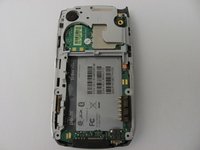
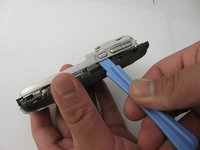
    • Using the plastic opening tool, gently separate the back case from the phone body.

  8. Palm Treo 700P Keypad Replacement, Motherboard: 8 단계, 이미지 3개 중 1개 Palm Treo 700P Keypad Replacement, Motherboard: 8 단계, 이미지 3개 중 2개 Palm Treo 700P Keypad Replacement, Motherboard: 8 단계, 이미지 3개 중 3개
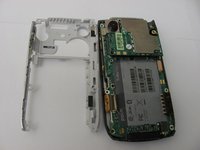
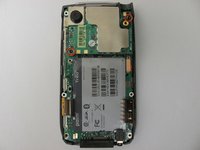
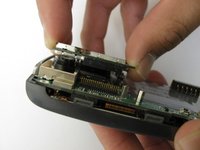
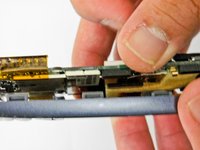
    • Using a plastic opening tool, gently edge your way between the back and border case (Picture 2) until they are completely separated (Picture 3).

  9. Palm Treo 700P Keypad Replacement: 9 단계, 이미지 3개 중 1개 Palm Treo 700P Keypad Replacement: 9 단계, 이미지 3개 중 2개 Palm Treo 700P Keypad Replacement: 9 단계, 이미지 3개 중 3개
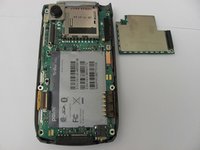
    • Remove the antenna chip by unscrewing the two screws with Torx T-5 screwdriver (Picture 1).

    • Once unscrewed, gently detach the antenna chip with your hands (Picture 2).

  10. Palm Treo 700P Keypad Replacement: 10 단계, 이미지 2개 중 1개 Palm Treo 700P Keypad Replacement: 10 단계, 이미지 2개 중 2개
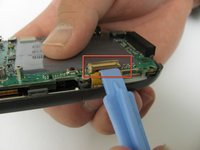
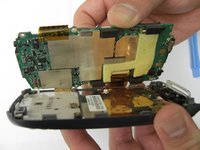
    • Use the plastic opening tool to unlock the tab holding the keyboard connection (Picture 1).

    • Once the keyboard connection is detached, use your hands to gently separate the motherboard from the back panel (Picture 2).

  11. Palm Treo 700P Keypad Replacement: 11 단계, 이미지 3개 중 1개 Palm Treo 700P Keypad Replacement: 11 단계, 이미지 3개 중 2개 Palm Treo 700P Keypad Replacement: 11 단계, 이미지 3개 중 3개
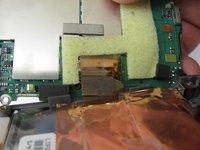
    • To completely detach the motherboard from the back panel, use the plastic opening tool to unlock the LCD connection from the motherboard (Picture 2).

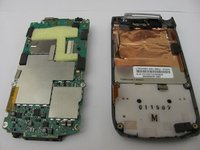
    • Once the LCD connection is unlocked, the motherboard should now be completely detached from the back panel, keyboard, and LCD (Picture 3).

  12. Palm Treo 700P Keypad Replacement, LCD: 12 단계, 이미지 1개 중 1개
    • Once the motherboard is removed, the LCD should be resting on the front case of the phone.

  13. Palm Treo 700P Keypad Replacement, Keypad: 13 단계, 이미지 1개 중 1개
    • Peel the keypad from the front panel of the case

  14. Palm Treo 700P Keypad Replacement: 14 단계, 이미지 1개 중 1개
    • Using a spudger, remove the gel keyboard from the front case.

결론

To reassemble your device, follow these instructions in reverse order.

작성자

5다른 기여자 명과 함께

James Smith

회원 가입일: 04/27/12

10 평판

안내서 3개를 작성함

Cal Poly, Team 12-37, Regan Spring 2012 Cal Poly, Team 12-37, Regan Spring 2012 회원

CPSU-REGAN-S12S12G37

4 회원들

안내서 14개를 작성함

0가이드 댓글

댓글 쓰기

조회 통계:

지난 24시간: 1

지난 7일: 6

지난 30일: 13

전체 시간: 783