필요한 것
-
-
-
Lift the flap on the Palm Zire M150 to see the back and all of the screws.
 FixBot에 문의하기
-
-
-
Use the T6 bit screw driver, and carefully remove the screws at the top of the device.
-
-
-
-
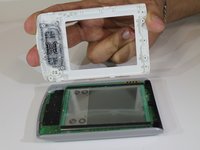
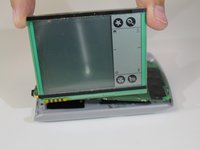
Turn the device over with the screen facing up. Gently pull the top and bottom cover from the device, as shown in the second photo.
-
-


결론
To reassemble your device, follow these instructions in reverse order.

팀

USF Sarasota-Manatee, Team 1-3, Stewart Spring 2016 USF Sarasota-Manatee, Team 1-3, Stewart Spring 2016 회원
USFSM-STEWART-S16S1G3
5 회원들
안내서 18개를 작성함
