주요 콘텐츠로 건너뛰기

Pantech Matrix Volume Button Replacement

필요한 것

  1. Pantech Matrix Volume Button Replacement, Phone Orientation: 1 단계, 이미지 1개 중 1개
    • Place phone with screen side facing toward you.

  2. Pantech Matrix Volume Button Replacement, Phone Orientation: 2 단계, 이미지 1개 중 1개
    • Flip phone over so screen side is now facing down.

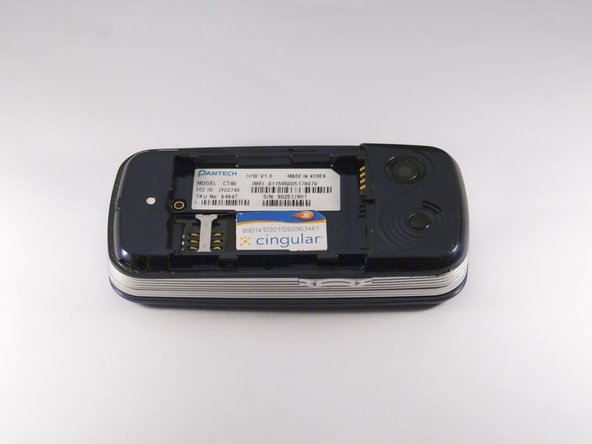
  3. Pantech Matrix Volume Button Replacement, Remove Back Cover: 3 단계, 이미지 2개 중 1개 Pantech Matrix Volume Button Replacement, Remove Back Cover: 3 단계, 이미지 2개 중 2개
    • Gently slide the backside phone cover off exposing the battery underneath.

  4. Pantech Matrix Volume Button Replacement, Lift Battery: 4 단계, 이미지 1개 중 1개
    • Carefully lift the battery up from where the spudger is pointed.

  5. Pantech Matrix Volume Button Replacement, Remove Battery: 5 단계, 이미지 1개 중 1개
    • Remove the battery from its dock.

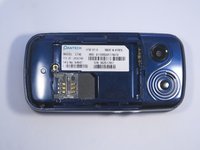
  6. Pantech Matrix Volume Button Replacement, Slide SIM Card Out: 6 단계, 이미지 3개 중 1개 Pantech Matrix Volume Button Replacement, Slide SIM Card Out: 6 단계, 이미지 3개 중 2개 Pantech Matrix Volume Button Replacement, Slide SIM Card Out: 6 단계, 이미지 3개 중 3개
    • Slide the SIM Card out of its dock.

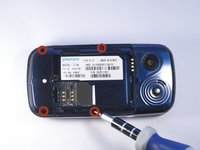
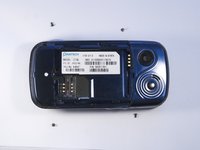
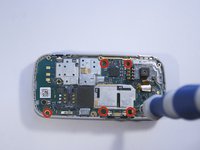
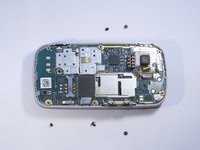
  7. Pantech Matrix Volume Button Replacement, Remove Phone Screws: 7 단계, 이미지 2개 중 1개 Pantech Matrix Volume Button Replacement, Remove Phone Screws: 7 단계, 이미지 2개 중 2개
    • Use a PH000 screwdriver to remove the four 2 mm screws from each corner of the device.

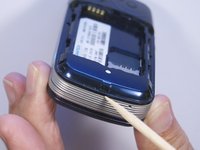
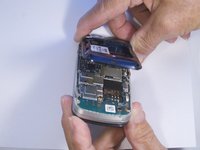
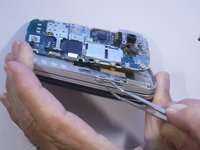
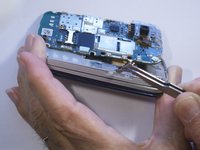
  8. Pantech Matrix Volume Button Replacement, Remove Phone Casing: 8 단계, 이미지 2개 중 1개 Pantech Matrix Volume Button Replacement, Remove Phone Casing: 8 단계, 이미지 2개 중 2개
    • Rotate the phone so the base is facing you.

    • Use spudger to separate phone casing and inside as shown.

    • Remove the casing carefully and set aside.

  9. Pantech Matrix Volume Button Replacement, Remove Camera Screws: 9 단계, 이미지 2개 중 1개 Pantech Matrix Volume Button Replacement, Remove Camera Screws: 9 단계, 이미지 2개 중 2개
    • Place phone with exposed motherboard facing you.

    • Use a PH000 screwdriver to remove the five 2 mm screws holding the camera in place.

  10. Pantech Matrix Volume Button Replacement, Remove Motherboard: 10 단계, 이미지 1개 중 1개
    • Carefully lift up the motherboard to expose the volume button.

  11. Pantech Matrix Volume Button Replacement, Remove Volume Button: 11 단계, 이미지 2개 중 1개 Pantech Matrix Volume Button Replacement, Remove Volume Button: 11 단계, 이미지 2개 중 2개
    이 단계에 사용된 도구:
    Tweezers
    $4.99
    • After moving the motherboard out of the way, locate the volume button.

    • Grasp the volume button with tweezers and pull gently to remove.

결론

To reassemble your device, follow these instructions in reverse order.

작성자

4다른 기여자 명과 함께

Zeel Patel

회원 가입일: 10/13/14

1,096 평판

안내서 9개를 작성함

0가이드 댓글

댓글 쓰기

조회 통계:

지난 24시간: 0

지난 7일: 2

지난 30일: 6

전체 시간: 203