소개
The base unit and headset are synchronized together when you bought them. So if you want to use a replacement headset with the base unit (or if you lose your connection to the base unit) you will need to follow these steps to synchronize the headset to the base:
-
-
-
Ensure the headset is in the base's cradle.
 FixBot에 문의하기
-
-
-
Press the volume control buttons on the back of the base until the front of the base flashes red.
-
-
-
-
Press the mute switch on top of the headset until the green light on the headset turns on.
-
-
-
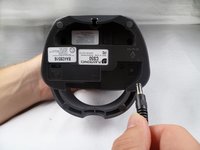
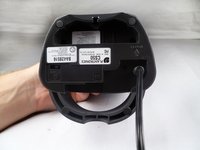
Unplug the power cord for five seconds. After the five seconds are over, reconnect the power cord.
-
-



다른 3명이 해당 안내서를 완성하였습니다.

팀

Cal Poly, Team 17-29, Amido Spring 2012 Cal Poly, Team 17-29, Amido Spring 2012 회원
CPSU-AMIDO-S12S17G29
4 회원들
안내서 48개를 작성함
