주요 콘텐츠로 건너뛰기
수리 커뮤니티 가입 - 계정 만들기

PlayStation VR Processor Unit Cooling Fan Replacement

필요한 것

  1. PlayStation VR Processor Unit Cooling Fan Replacement, Processor Unit Cooling Fan: 1 단계, 이미지 3개 중 1개 PlayStation VR Processor Unit Cooling Fan Replacement, Processor Unit Cooling Fan: 1 단계, 이미지 3개 중 2개 PlayStation VR Processor Unit Cooling Fan Replacement, Processor Unit Cooling Fan: 1 단계, 이미지 3개 중 3개
    • On one side of the console (the side adjacent to the fan vent), there will be two 6 mm screws. Unscrew them with a PH #000 screwdriver.

    댓글 쓰기

  2. PlayStation VR Processor Unit Cooling Fan Replacement: 2 단계, 이미지 3개 중 1개 PlayStation VR Processor Unit Cooling Fan Replacement: 2 단계, 이미지 3개 중 2개 PlayStation VR Processor Unit Cooling Fan Replacement: 2 단계, 이미지 3개 중 3개
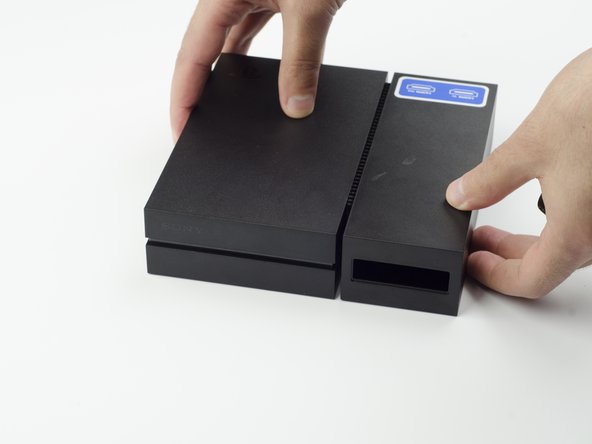
    • Press and slide the side panel (it will have the two ports) back to reveal an additional 6 mm screw.

    • Unscrew the 6mm screw with a PH #000 screwdriver.

    댓글 쓰기

  3. PlayStation VR Processor Unit Cooling Fan Replacement: 3 단계, 이미지 2개 중 1개 PlayStation VR Processor Unit Cooling Fan Replacement: 3 단계, 이미지 2개 중 2개
    • Slide the panel back into place.

    댓글 쓰기

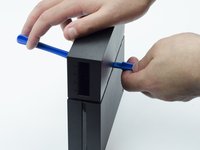
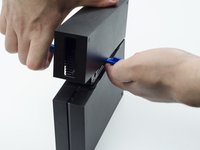
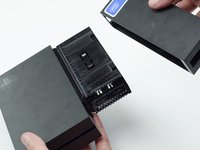
  4. PlayStation VR Processor Unit Cooling Fan Replacement: 4 단계, 이미지 3개 중 1개 PlayStation VR Processor Unit Cooling Fan Replacement: 4 단계, 이미지 3개 중 2개 PlayStation VR Processor Unit Cooling Fan Replacement: 4 단계, 이미지 3개 중 3개
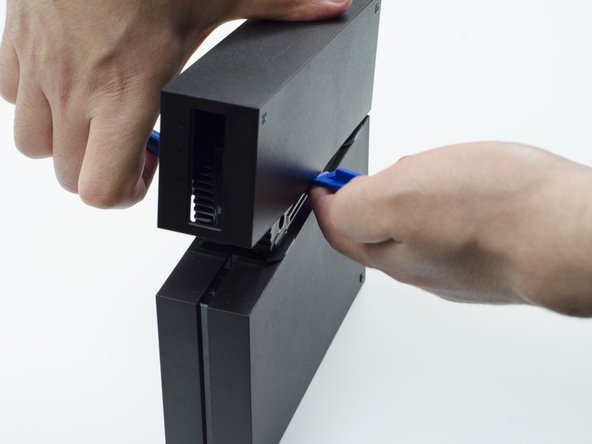
    • Using a plastic opening tool, carefully pry the panel from the main console to reveal the HDMI ports.

    • You will probably need to lift it on both sides in order for the panel to come loose.

    댓글 쓰기

  5. PlayStation VR Processor Unit Cooling Fan Replacement: 5 단계, 이미지 1개 중 1개
    • Turn the console over.

    • Unscrew the two 9 mm screws with a PH #000 screwdriver.

    댓글 쓰기

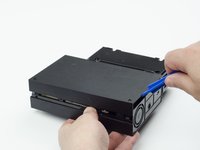
  6. PlayStation VR Processor Unit Cooling Fan Replacement: 6 단계, 이미지 2개 중 1개 PlayStation VR Processor Unit Cooling Fan Replacement: 6 단계, 이미지 2개 중 2개
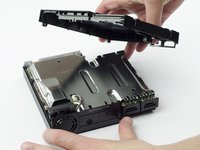
    • With the plastic opening tool, carefully pry the console shell panel free and lift it away.

    댓글 쓰기

  7. PlayStation VR Processor Unit Cooling Fan Replacement: 7 단계, 이미지 2개 중 1개 PlayStation VR Processor Unit Cooling Fan Replacement: 7 단계, 이미지 2개 중 2개
    이 단계에 사용된 도구:
    Tweezers
    $4.99
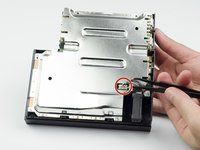
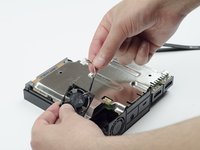
    • Using tweezers, carefully pull the multi colored bundled cable from its port connecting the fan to the console.

    • Carefully lift the fan and its wiring from the device.

    • Be mindful of damaging the wires.

    • Take care to keep your fingers away from the fan blades.

    댓글 쓰기

결론

To reassemble your device, follow these instructions in reverse order.

취소: 해당 안내서를 완성하지 않았습니다.

다른 8명이 해당 안내서를 완성하였습니다.

작성자

5다른 기여자 명과 함께

Sarah Shand

회원 가입일: 02/20/17

1,996 평판

안내서 7개를 작성함

USF Tampa, Team S3-G1, Sullivan Spring 2017 USF Tampa, Team S3-G1, Sullivan Spring 2017 회원

USFT-SULLIVAN-S17S3G1

3 회원들

안내서 14개를 작성함

4가이드 댓글

Where do I get a replacement fan tho?

Ponos King - 답글 공유

I think is a 3x3 cm fan, alliexpres has some, but what voltage?

crus - 답글 공유

5V is what i have read

Ethan Amos - 답글 공유

Reference for fan when I have replaced mine : DELTA ELECTRONICS MODEL : ASB0305MA-01 DC 5V 0.19A

herossuperman - 답글 공유

댓글 쓰기

조회 통계:

지난 24시간: 3

지난 7일: 17

지난 30일: 86

전체 시간: 10,677