소개
Power is one of the biggest problems of the polaroid PMID 4312 tablet. This guide will show you how to replace the battery.
필요한 것
-
-
-
Pry the seam between the screen and the case and slide it on all four sides with a large plastic opening tool until the plastic case comes off.
 FixBot에 문의하기
-
-
-
Lift the device off of the case and flip over the device so that it sits screen side down.
-
-
-
이 단계에 사용된 도구:Plastic Cards$2.99
-
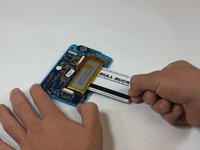
Wedge a plastic card beneath the battery unit and wiggle the card side to side and up and down gently until the glue sealing the battery to the device is broken.
-
-
-
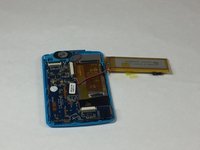
Peel back any yellow tape not directly attached to the battery.
-
Using a soldering iron, desolder the two wires that connect the battery to the motherboard.
-
-



To reassemble your device, follow these instructions in reverse order.

팀

USF Tampa, Team 5-4, Lacy Fall 2016 USF Tampa, Team 5-4, Lacy Fall 2016 회원
USFT-LACY-F16S5G4
4 회원들
안내서 10개를 작성함
