주요 콘텐츠로 건너뛰기

PowerBook 3400 M3553 RAM Replacement

필요한 것

  1. PowerBook 3400 M3553 RAM Replacement, Battery: 1 단계, 이미지 1개 중 1개
    • Close the screen and turn the PowerBook over, orienting the computer upside down, using the label to guide you.

  2. PowerBook 3400 M3553 RAM Replacement: 2 단계, 이미지 2개 중 1개 PowerBook 3400 M3553 RAM Replacement: 2 단계, 이미지 2개 중 2개
    • Hold the button on the front left side and slide the battery out.

  3. PowerBook 3400 M3553 RAM Replacement, Keyboard: 3 단계, 이미지 1개 중 1개
    • With a Torx T8 screwdriver, remove the three Torx 24mm screws along the center of the back panel.

  4. PowerBook 3400 M3553 RAM Replacement: 4 단계, 이미지 3개 중 1개 PowerBook 3400 M3553 RAM Replacement: 4 단계, 이미지 3개 중 2개 PowerBook 3400 M3553 RAM Replacement: 4 단계, 이미지 3개 중 3개
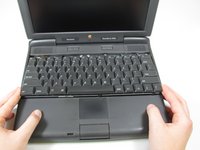
    • Turn the computer over and open the display. You should see that the keyboard is loose.

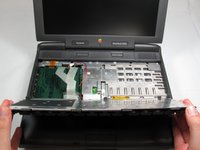
    • Before attempting to remove the keyboard, note that a ribbon cable connects the keyboard to the logic board. Improper removal may damage your keyboard.

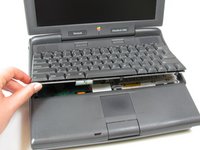
    • Slightly lift the front of the keyboard up, and slide the keyboard towards yourself.

    • Carefully lift the top half of the keyboard and pull it towards yourself.

  5. PowerBook 3400 M3553 RAM Replacement: 5 단계, 이미지 2개 중 1개 PowerBook 3400 M3553 RAM Replacement: 5 단계, 이미지 2개 중 2개
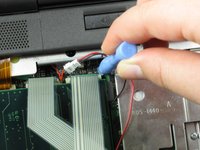
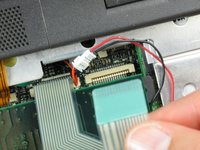
    • Loosen the ribbon cables connecting the keyboard to the computer by using a plastic opening tool to lift the tabs on either side of the cable port.

    • Gently remove the ribbons from its tabs.

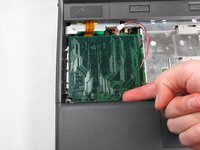
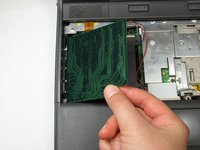
  6. PowerBook 3400 M3553 RAM Replacement, RAM: 6 단계, 이미지 2개 중 1개 PowerBook 3400 M3553 RAM Replacement, RAM: 6 단계, 이미지 2개 중 2개
    • Gently wiggle the RAM card to loosen the connection until it pulls free.

결론

To install the new RAM card, follow these steps in reverse order.

다른 2명이 해당 안내서를 완성하였습니다.

작성자

3다른 기여자 명과 함께

Michael Mondragon

회원 가입일: 04/12/11

397 평판

안내서 9개를 작성함

Cal Poly, Team 24-59, Amido Spring 2011 Cal Poly, Team 24-59, Amido Spring 2011 회원

CPSU-AMIDO-S11S24G59

4 회원들

안내서 9개를 작성함

1가이드 댓글

To reattach the keyboard I found it necessary to keep the kid open and push the keyboard all the way down; otherwise, the screws didn’t engage.

Scott - 답글

댓글 쓰기

조회 통계:

지난 24시간: 0

지난 7일: 3

지난 30일: 10

전체 시간: 2,866