주요 콘텐츠로 건너뛰기

PowerMac G4 M5183 RAM

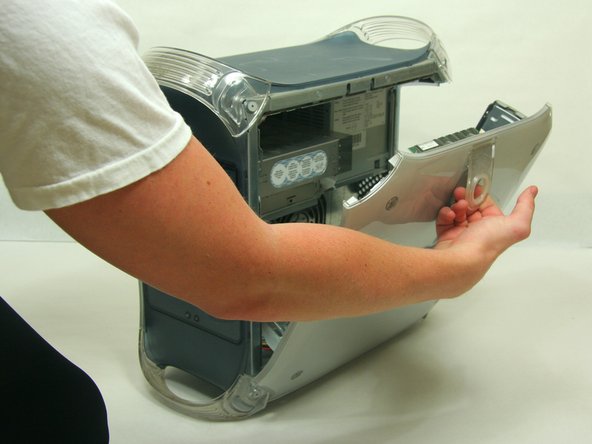
  1. PowerMac G4 M5183 RAM, Opening PowerMac G4 M5183 Case: 1 단계, 이미지 2개 중 1개 PowerMac G4 M5183 RAM, Opening PowerMac G4 M5183 Case: 1 단계, 이미지 2개 중 2개
    • Pull on outer latch.

    • Lower door until it is level with your work surface.

    • Before working on the computer make sure it is not plugged into a power supply, then touch a metal object. This discharges static electricity, which could damage the computer.

  2. PowerMac G4 M5183 RAM, RAM: 2 단계, 이미지 2개 중 1개 PowerMac G4 M5183 RAM, RAM: 2 단계, 이미지 2개 중 2개
    • Locate the RAM modules.

    • Pull side tabs outward. The RAM will pop out of the housing.

결승점

다른 13명이 해당 안내서를 완성하였습니다.

작성자

6다른 기여자 명과 함께

Justin Petrilli

회원 가입일: 01/21/10

3,132 평판

안내서 11개를 작성함

Cal Poly, Team 13-24, Maness Winter 2010 Cal Poly, Team 13-24, Maness Winter 2010 회원

CPSU-MANESS-W10S13G24

4 회원들

안내서 37개를 작성함

0가이드 댓글

댓글 쓰기

조회 통계:

지난 24시간: 0

지난 7일: 1

지난 30일: 9

전체 시간: 7,112