소개
This is a guide for accessing the internal workings of the camera. Before following these instructions make sure the proper replacement parts are available.
필요한 것
-
-
-
-
Remove this final screw from the memory card compartment.
-
Remove the chassis by pulling the back cover away from the camera.
-
-
-
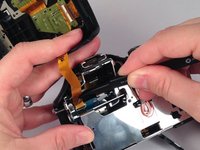
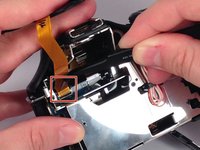
Gently but forcefully lift up on the parallel cable connecting the two halves of the camera.
-


 FixBot에 문의하기


다른 4명이 해당 안내서를 완성하였습니다.

팀

USF Tampa, Team 4-4, Meier Fall 2015 USF Tampa, Team 4-4, Meier Fall 2015 회원
USFT-MEIER-F15S4G4
4 회원들
안내서 10개를 작성함
