주요 콘텐츠로 건너뛰기

Remove IBM WorkPad c3 Battery

필요한 것

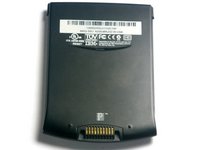
  1. Remove IBM WorkPad c3 Battery, Back Case: 1 단계, 이미지 2개 중 1개 Remove IBM WorkPad c3 Battery, Back Case: 1 단계, 이미지 2개 중 2개
    • Turn the device over so that the screen is facing down.

    • In the next step the device will be heated, so the screen must be turned over to prevent heat damage to the LCD/Digitizer.

  2. Remove IBM WorkPad c3 Battery: 2 단계, 이미지 1개 중 1개
    • Using a hair dryer, slowly heat the edges of the WorkPad.

    • Spend at least one minute heating each side of the device. This will melt the glue holding the case together, and allow it to be removed.

    • Be sure not to touch the device directly after heating as it will be extremely hot. Use a towel or oven mitt to grab it.

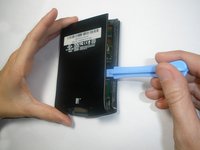
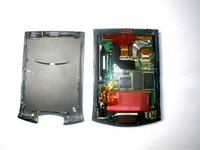
  3. Remove IBM WorkPad c3 Battery: 3 단계, 이미지 2개 중 1개 Remove IBM WorkPad c3 Battery: 3 단계, 이미지 2개 중 2개
    • Use a plastic opening tool to pry the back case from the WorkPad.

    • If the rear cover is not coming off very easily, you probably need to reheat the case in order to sufficiently melt the glue.

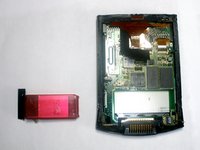
  4. Remove IBM WorkPad c3 Battery, Battery: 4 단계, 이미지 1개 중 1개
    • Remove the yellow tape that is covering the battery connector

  5. Remove IBM WorkPad c3 Battery: 5 단계, 이미지 1개 중 1개
    이 단계에 사용된 도구:
    Tweezers
    $4.99
    • Using the tweezers, carefully disconnect the battery cable from the port

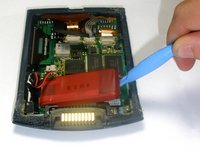
  6. Remove IBM WorkPad c3 Battery: 6 단계, 이미지 2개 중 1개 Remove IBM WorkPad c3 Battery: 6 단계, 이미지 2개 중 2개
    • Using the plastic opening tools, lift the battery out of the case

    • The battery is secured with adhesive and it will take some effort to remove

결론

To reassemble your device, follow these instructions in reverse order.

다른 한 분이 해당 안내서를 완성하였습니다.

작성자

4다른 기여자 명과 함께

Emily Falkenstein

회원 가입일: 10/05/10

75 평판

안내서 5개를 작성함

Cal Poly, Team 21-35, Regan Fall 2010 Cal Poly, Team 21-35, Regan Fall 2010 회원

CPSU-REGAN-F10S21G35

3 회원들

안내서 5개를 작성함

0가이드 댓글

댓글 쓰기

조회 통계:

지난 24시간: 1

지난 7일: 9

지난 30일: 28

전체 시간: 4,584