주요 콘텐츠로 건너뛰기

Removing Back Cover

필요한 것

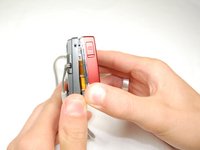
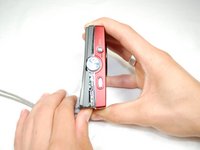
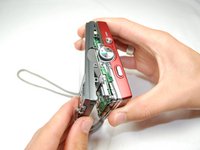
  1. Removing Back Cover, Removing Back Cover: 1 단계, 이미지 3개 중 1개 Removing Back Cover, Removing Back Cover: 1 단계, 이미지 3개 중 2개 Removing Back Cover, Removing Back Cover: 1 단계, 이미지 3개 중 3개
    • Remove the six external screws from the camera using a Phillips #0 screwdriver.

    • After the screws has been removed, the bottom of the back half of the external case should be loosened from the camera.

    • Be careful, make sure you don't lose the screws.

  2. Removing Back Cover: 2 단계, 이미지 2개 중 1개 Removing Back Cover: 2 단계, 이미지 2개 중 2개
    • Open the battery cover that's located on the bottom right side of the camera and carefully remove the battery.

  3. Removing Back Cover: 3 단계, 이미지 3개 중 1개 Removing Back Cover: 3 단계, 이미지 3개 중 2개 Removing Back Cover: 3 단계, 이미지 3개 중 3개
    • Slide your fingernail or a plastic spudger in the groove from the bottom to the top right side of the camera.

  4. Removing Back Cover: 4 단계, 이미지 1개 중 1개
    • Carefully squeeze the top right corner of the camera and pry off the external cover.

    • If you hear a "cracking" sound. This is normal.

    • Continue to pull the external cover and it will come off cleanly.

    • Be cautious of the flash capacitor. It carries an electrical charge, that may give you an unpleasant shock.

  5. Removing Back Cover: 5 단계, 이미지 1개 중 1개
    • Carefully pull off the back cover, parts behind the back of the case might fall out.

결승점

다른 4명이 해당 안내서를 완성하였습니다.

작성자

11다른 기여자 명과 함께

Hasit

회원 가입일: 04/15/10

207 평판

안내서 2개를 작성함

Cal Poly, Team 6-17, Maness Spring 2010 Cal Poly, Team 6-17, Maness Spring 2010 회원

CPSU-MANESS-S10S6G17

4 회원들

안내서 10개를 작성함

0가이드 댓글

댓글 쓰기

조회 통계:

지난 24시간: 1

지난 7일: 5

지난 30일: 19

전체 시간: 4,591