주요 콘텐츠로 건너뛰기
수리 커뮤니티 가입 - 계정 만들기

Replacing Creative Zen X-Fi Speaker

필요한 것

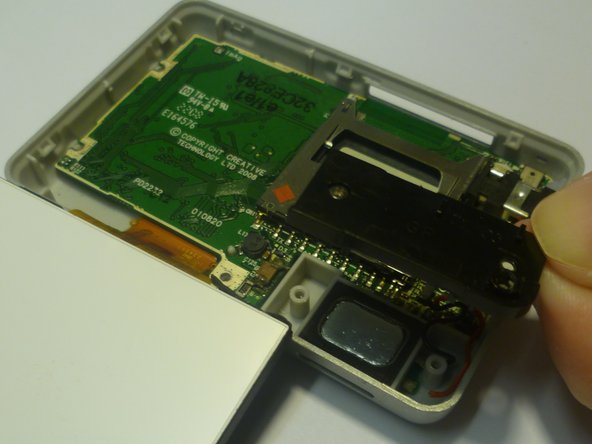
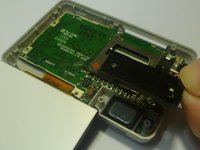
  1. Replacing Creative Zen X-Fi Speaker, Detaching Front Case: 1 단계, 이미지 3개 중 1개 Replacing Creative Zen X-Fi Speaker, Detaching Front Case: 1 단계, 이미지 3개 중 2개 Replacing Creative Zen X-Fi Speaker, Detaching Front Case: 1 단계, 이미지 3개 중 3개
    • Using a spudger, wedge the tip between the front and back case to pry them apart.

    • Be careful to not apply excessive force since there are six fasteners on the screen's side that holds the cases firmly together.

  2. Replacing Creative Zen X-Fi Speaker, Rubber Button Cover: 2 단계, 이미지 1개 중 1개
    • The black rubber button pad can be removed by simply picking it up.

  3. Replacing Creative Zen X-Fi Speaker, Button Input Chip Part 1: 3 단계, 이미지 1개 중 1개
    • Flip the LCD screen off the midsection plate to gain access to the space around the input button chip.

  4. Replacing Creative Zen X-Fi Speaker, Button Input Chip: 4 단계, 이미지 1개 중 1개
    • Using a spudger, pry off the button input chip from the mid-section of the device. To gain best leverage, start at the bottom right corner and level your way up the side of the chip.

    • Be aware that the button input chip is glued to the mid-section, so some extra force may be required.

  5. Replacing Creative Zen X-Fi Speaker, Access Midsection Plate: 5 단계, 이미지 1개 중 1개
    • Lift open the LCD screen and button input chip to access the entire midsection plate.

  6. Replacing Creative Zen X-Fi Speaker, Unscrew below Button Chip: 6 단계, 이미지 1개 중 1개
    • Use a Phillips Head screwdriver to unscrew the three 3/16 inch screws that were underneath the button input chip.

  7. Replacing Creative Zen X-Fi Speaker, Unscrew below LCD Screen: 7 단계, 이미지 1개 중 1개
    • Use a Phillips Head screwdriver to unscrew the three 3/16 inch screws that were underneath the LCD screen.

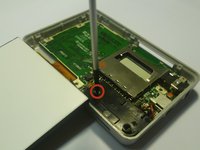
  8. Replacing Creative Zen X-Fi Speaker, Unscrew Speaker's Cover: 8 단계, 이미지 2개 중 1개 Replacing Creative Zen X-Fi Speaker, Unscrew Speaker's Cover: 8 단계, 이미지 2개 중 2개
    • Use a Phillips Head screwdriver to unscrew the 3/16 inch screw that attaches the speaker's cover the the back case.

    • Once unscrewed, pick up the case and put it to the side.

  9. Replacing Creative Zen X-Fi Speaker, Removing the Speaker: 9 단계, 이미지 1개 중 1개
    이 단계에 사용된 도구:
    Tweezers
    $4.99
    • With the speaker exposed, use a pair of tweezers to lift the speaker out of the slot.

결론

To reassemble your device, follow these instructions in reverse order.

다른 한 분이 해당 안내서를 완성하였습니다.

작성자

3다른 기여자 명과 함께

Westley Courchene

회원 가입일: 01/13/15

3,410 평판

안내서 14개를 작성함

0가이드 댓글

댓글 쓰기

조회 통계:

지난 24시간: 2

지난 7일: 5

지난 30일: 49

전체 시간: 579