주요 콘텐츠로 건너뛰기
수리 커뮤니티 가입 - 계정 만들기

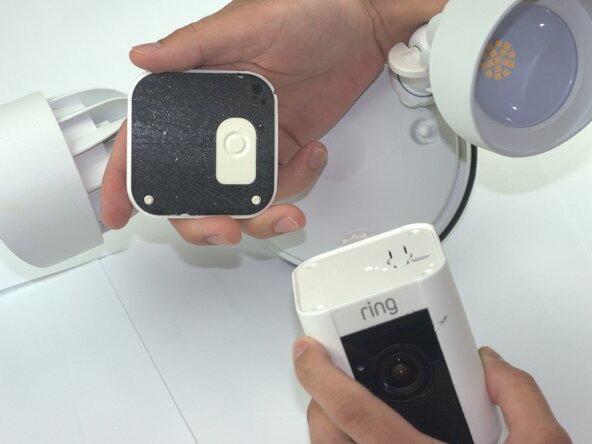
Ring Floodlight Cam Camera Module Replacement

필요한 것

  1. Ring Floodlight Cam Camera Module Replacement, Motherboard: 1 단계, 이미지 2개 중 1개 Ring Floodlight Cam Camera Module Replacement, Motherboard: 1 단계, 이미지 2개 중 2개
    • Remove the external cover with a Jimmy tool.

    댓글 쓰기

  2. Ring Floodlight Cam Camera Module Replacement: 2 단계, 이미지 2개 중 1개 Ring Floodlight Cam Camera Module Replacement: 2 단계, 이미지 2개 중 2개
    • Remove the four outer cover 4.5mm screws with a Philips 1 screwdriver.

    댓글 쓰기

  3. Ring Floodlight Cam Camera Module Replacement: 3 단계, 이미지 1개 중 1개
    • Remove the internal cover.

    댓글 쓰기

  4. Ring Floodlight Cam Camera Module Replacement: 4 단계, 이미지 1개 중 1개
    • Disconnect the flexible flat cable (FFC) from the motherboard.

    댓글 쓰기

  5. Ring Floodlight Cam Camera Module Replacement: 5 단계, 이미지 1개 중 1개
    • Remove the three-prong connector with angled tweezers.

    댓글 쓰기

  6. Ring Floodlight Cam Camera Module Replacement: 6 단계, 이미지 1개 중 1개
    • Remove the 2mm screws with a Phillips #00 screwdriver.

    댓글 쓰기

  7. Ring Floodlight Cam Camera Module Replacement: 7 단계, 이미지 2개 중 1개 Ring Floodlight Cam Camera Module Replacement: 7 단계, 이미지 2개 중 2개
    • Remove the power supply.

    • Disconnect the power supply from the device.

    댓글 쓰기

  8. Ring Floodlight Cam Camera Module Replacement: 8 단계, 이미지 1개 중 1개
    • Remove the 2mm screws with a Phillips 00 screwdriver from the base connector.

    • From this step forward use a low profile wrench instead of a screwdriver with the correct bit size to remove screws non-destructively.

    댓글 쓰기

  9. Ring Floodlight Cam Camera Module Replacement: 9 단계, 이미지 2개 중 1개 Ring Floodlight Cam Camera Module Replacement: 9 단계, 이미지 2개 중 2개
    • Drill holes into the exterior with a 1/16 drill bit.

    • Skip this step unless you lack the specialized tools or other attempts to remove screws non destructively were unsuccessful.

    댓글 쓰기

  10. Ring Floodlight Cam Camera Module Replacement: 10 단계, 이미지 1개 중 1개
    • Unscrew the 2mm screws on the metal baseplate with a Phillips 00 screwdriver.

    댓글 쓰기

  11. Ring Floodlight Cam Camera Module Replacement: 11 단계, 이미지 1개 중 1개
    • Remove the metal baseplate.

    댓글 쓰기

  12. Ring Floodlight Cam Camera Module Replacement: 12 단계, 이미지 1개 중 1개
    • Remove the power connector from the motherboard using angled tweezers.

    댓글 쓰기

  13. Ring Floodlight Cam Camera Module Replacement: 13 단계, 이미지 1개 중 1개
    • Remove the front-end flexible flat cable (FFC) with angled tweezers.

    댓글 쓰기

  14. Ring Floodlight Cam Camera Module Replacement: 14 단계, 이미지 1개 중 1개
    • Remove the motion sensor flat flexible cable (FFC).

    댓글 쓰기

  15. Ring Floodlight Cam Camera Module Replacement: 15 단계, 이미지 2개 중 1개 Ring Floodlight Cam Camera Module Replacement: 15 단계, 이미지 2개 중 2개
    • Remove the motherboard module.

    댓글 쓰기

  16. Ring Floodlight Cam Camera Module Replacement, Camera Module: 16 단계, 이미지 1개 중 1개
    • Drill holes with a 1/16 drill bit.

    댓글 쓰기

  17. Ring Floodlight Cam Camera Module Replacement: 17 단계, 이미지 2개 중 1개 Ring Floodlight Cam Camera Module Replacement: 17 단계, 이미지 2개 중 2개
    • Remove the 2mm screws with an iFixit PH00 screwdriver.

    댓글 쓰기

  18. Ring Floodlight Cam Camera Module Replacement: 18 단계, 이미지 1개 중 1개
    • Peel the copper strip from camera module.

    • Remove the metal baseplate.

    댓글 쓰기

  19. Ring Floodlight Cam Camera Module Replacement: 19 단계, 이미지 2개 중 1개 Ring Floodlight Cam Camera Module Replacement: 19 단계, 이미지 2개 중 2개
    • Unplug the WiFi antenna cables with angled tweezers.

    댓글 쓰기

  20. Ring Floodlight Cam Camera Module Replacement: 20 단계, 이미지 2개 중 1개 Ring Floodlight Cam Camera Module Replacement: 20 단계, 이미지 2개 중 2개
    • Remove 2mm screws with a PH00 screwdriver.

    댓글 쓰기

  21. Ring Floodlight Cam Camera Module Replacement: 21 단계, 이미지 1개 중 1개
    • Remove the 3 pin power connector from the camera module.

    댓글 쓰기

  22. Ring Floodlight Cam Camera Module Replacement: 22 단계, 이미지 3개 중 1개 Ring Floodlight Cam Camera Module Replacement: 22 단계, 이미지 3개 중 2개 Ring Floodlight Cam Camera Module Replacement: 22 단계, 이미지 3개 중 3개
    • Remove the camera module.

    댓글 쓰기

결론

To reassemble your device, follow these instructions in reverse order and before inserting power supply fill the drill holes with plastic putty.

취소: 해당 안내서를 완성하지 않았습니다.

작성자

3다른 기여자 명과 함께

Samuel Garcia

회원 가입일: 02/04/26

381 평판

안내서 2개를 작성함

Texas Tech, Team 41-3, Johansen Spring 2026 Texas Tech, Team 41-3, Johansen Spring 2026 회원

TTU-JOHANSEN-S26S41G3

4 회원들

안내서 5개를 작성함

0가이드 댓글

댓글 쓰기

조회 통계:

지난 24시간: 4

지난 7일: 25

지난 30일: 25

전체 시간: 98