소개
Before removing keys from your laptop, make sure that you have a plastic opening tool. After removing the key, having the following tools can come in handy: a cloth, compressed air can, or some rubbing alcohol to clean each key and the area underneath. Be very careful when removing keys and take your time, because the attachments to the keys and the keys themselves can break! If the keys themselves do break, extra keys can be bought online. For further instructions, check out the guide.
필요한 것
-
-
-
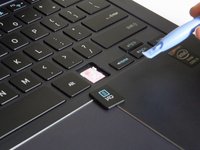
Pivot the tool upwards. This should pry the key away from the keyboard.
-
Continue lifting the tool until the key comes away completely or gently pull the key off. Repeat for other keys as needed.
-


 FixBot에 문의하기



To reassemble your device, follow these instructions in reverse order.
다른 3명이 해당 안내서를 완성하였습니다.

팀

Baylor, Team 2-3, Grigsby Spring 2015 Baylor, Team 2-3, Grigsby Spring 2015 회원
BU-GRIGSBY-S15S2G3
4 회원들
안내서 4개를 작성함
