주요 콘텐츠로 건너뛰기
수리 커뮤니티 가입 - 계정 만들기

Samsung Chromebook Pro Battery Replacement

필요한 것

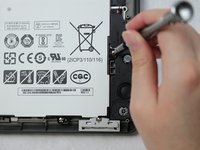
  1. Samsung Chromebook Pro Battery Replacement, Battery: 1 단계, 이미지 2개 중 1개 Samsung Chromebook Pro Battery Replacement, Battery: 1 단계, 이미지 2개 중 2개
    • Remove the eight 30 mm screws from the edges of the case with the JIS J000 screw bit.

  2. Samsung Chromebook Pro Battery Replacement: 2 단계, 이미지 3개 중 1개 Samsung Chromebook Pro Battery Replacement: 2 단계, 이미지 3개 중 2개 Samsung Chromebook Pro Battery Replacement: 2 단계, 이미지 3개 중 3개
    • Slide the plastic opening tool in a corner at a steep angle, and lift to remove the outer case.

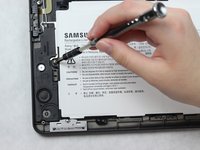
  3. Samsung Chromebook Pro Battery Replacement: 3 단계, 이미지 2개 중 1개 Samsung Chromebook Pro Battery Replacement: 3 단계, 이미지 2개 중 2개
    • Remove the four 30 mm screws surrounding the battery with the JIS J000 screw bit.

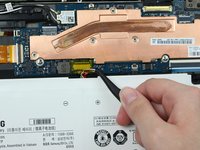
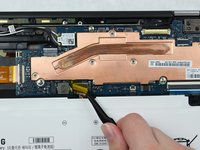
  4. Samsung Chromebook Pro Battery Replacement: 4 단계, 이미지 3개 중 1개 Samsung Chromebook Pro Battery Replacement: 4 단계, 이미지 3개 중 2개 Samsung Chromebook Pro Battery Replacement: 4 단계, 이미지 3개 중 3개
    이 단계에 사용된 도구:
    Tweezers
    $4.99
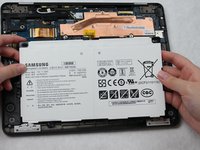
    • Lift the connecting wires to disconnect from the slot with the precision tweezers.

    • Lift battery to remove once the wire is disconnected.

결론

To reassemble your device, follow these instructions in reverse order.

다른 4명이 해당 안내서를 완성하였습니다.

작성자

3다른 기여자 명과 함께

Amber Castro-Beltran

회원 가입일: 10/09/18

933 평판

안내서 5개를 작성함

Sam Houston State, Team S15-G1, Blackburne Fall 2018 Sam Houston State, Team S15-G1, Blackburne Fall 2018 회원

SHSU-BLACKBURNE-F18S15G1

4 회원들

안내서 10개를 작성함

1가이드 댓글

How do I know which battery to order? Is there a specific part number?

Will - 답글

댓글 쓰기

조회 통계:

지난 24시간: 0

지난 7일: 2

지난 30일: 19

전체 시간: 3,140