주요 콘텐츠로 건너뛰기

Samsung Galaxy Note 3 Motherboard Replacement

필요한 것

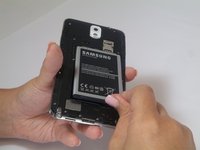
  1. Samsung Galaxy Note 3 Motherboard Replacement, Remove the rear case: 1 단계, 이미지 1개 중 1개
    • Insert a fingernail or plastic opening tool in the gap between the rear case and the base of the phone.

  2. Samsung Galaxy Note 3 Motherboard Replacement, Remove Case from the Base: 2 단계, 이미지 2개 중 1개 Samsung Galaxy Note 3 Motherboard Replacement, Remove Case from the Base: 2 단계, 이미지 2개 중 2개
    • Slide your fingernail or plastic opening tool along the edge of the rear case.

    • Lift the case gently from the base.

  3. Samsung Galaxy Note 3 Motherboard Replacement, Battery: 3 단계, 이미지 2개 중 1개 Samsung Galaxy Note 3 Motherboard Replacement, Battery: 3 단계, 이미지 2개 중 2개
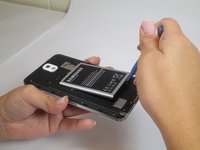
    • Insert a fingernail or plastic opening tool into the small gap between the battery and the phone base.

    • Lift the battery out of its recess.

  4. Samsung Galaxy Note 3 Motherboard Replacement, S Pen: 4 단계, 이미지 1개 중 1개
    • Place your fingernail in the groove of the stylus pen.

    • Pull the stylus pen away from the phone.

  5. Samsung Galaxy Note 3 Motherboard Replacement, Unscrew Back Chassis: 5 단계, 이미지 1개 중 1개
    • Remove the twelve 4mm Phillips #00 screws from the back chassis.

  6. Samsung Galaxy Note 3 Motherboard Replacement, Remove Back Chassis: 6 단계, 이미지 1개 중 1개
    • Insert the plastic opening tool into the Stylus Pen placement holder.

    • Lift the plastic opening tool so that the midframe separates from the base.

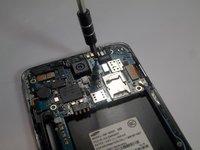
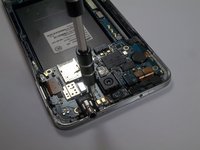
  7. Samsung Galaxy Note 3 Motherboard Replacement, Screw Removal: 7 단계, 이미지 2개 중 1개 Samsung Galaxy Note 3 Motherboard Replacement, Screw Removal: 7 단계, 이미지 2개 중 2개
    • Remove the single screw beside headphone jack.

  8. Samsung Galaxy Note 3 Motherboard Replacement, Unfasten Clips and Cable Connectors: 8 단계, 이미지 2개 중 1개 Samsung Galaxy Note 3 Motherboard Replacement, Unfasten Clips and Cable Connectors: 8 단계, 이미지 2개 중 2개
    이 단계에 사용된 도구:
    Tweezers
    $4.99
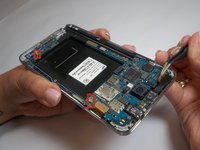
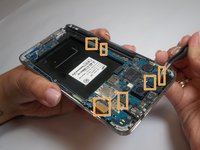
    • Use tweezers to remove both antenna clips.

    • Use a spudger to disconnect six cable connectors.

  9. Samsung Galaxy Note 3 Motherboard Replacement, Motherboard Removal: 9 단계, 이미지 1개 중 1개
    • Pull up on the motherboard with tweezers.

결론

To reassemble your device, follow these instructions in reverse order.

다른 74명이 해당 안내서를 완성하였습니다.

작성자

6다른 기여자 명과 함께

Brittany Gail

회원 가입일: 09/23/14

8,539 평판

안내서 8개를 작성함

USF Tampa, Team 2-2, Blackwell Fall 2014 USF Tampa, Team 2-2, Blackwell Fall 2014 회원

USFT-BLACKWELL-F14S2G2

4 회원들

안내서 25개를 작성함

4가이드 댓글

I'm looking for the screws for this phone, but all the search hits I've come across are for the screwdriver. Any leads on where I can find the screws?

Jared Lunt - 답글

I can replace motherboard sm-n9005 with motherboard sm-n900

yacine - 답글

I want to replace motherboard of galaxy note 3 SM-N900 with SM-N9005. Is it possible and can it convert 3g to 4G. Because my phone doesn't support 4G .it is 3g and I want to make it 4G .what should I do help me

Nippy Preet -

I am also looking for the same question

Jalil Ahmad -

댓글 쓰기

조회 통계:

지난 24시간: 4

지난 7일: 14

지난 30일: 52

전체 시간: 51,538