주요 콘텐츠로 건너뛰기
수리 커뮤니티 가입 - 계정 만들기

Samsung Galaxy Note5 Volume Button Replacement

필요한 것

    1. Samsung Galaxy Note5 Volume Button Replacement, SIM Card Tray: 1 단계, 이미지 1개 중 1개
      • Insert a SIM Ejector Tool into the small hole on the left side of the top edge of the device.

      • Press down until the SIM Card Tray begins to protrude out of the device.

      댓글 쓰기

    2. Samsung Galaxy Note5 Volume Button Replacement: 2 단계, 이미지 1개 중 1개
      • Remove the SIM Card Tray from the slot.

      댓글 쓰기

    1. Samsung Galaxy Note5 Volume Button Replacement, Power Button: 3 단계, 이미지 1개 중 1개
      • Heat the back of the device with a heat gun for 2 minutes

      댓글 쓰기

    2. Samsung Galaxy Note5 Volume Button Replacement: 4 단계, 이미지 1개 중 1개
      • Once the device is heated, place a suction cup near the bottom of the back of the device Make sure it is placed on the flat part of the glass

      • Be careful holding the device after heating the back, it may burn!

      • Gently pull upwards on the suction cup to separate the rear glass from the body of the phone.

      • While pulling upwards, insert a pick under the rear glass

      댓글 쓰기

    3. Samsung Galaxy Note5 Volume Button Replacement: 5 단계, 이미지 1개 중 1개
      • Keeping the pick under the rear glass, move the pick along the bottom edge of the device to cut the adhesive.

      댓글 쓰기

    4. Samsung Galaxy Note5 Volume Button Replacement: 6 단계, 이미지 1개 중 1개
      • Repeat the previous heating and cutting procedure for the remaining three sides of the phone.

      • Leave a pick on each side as you continue to the next to prevent the adhesive from resealing.

      댓글 쓰기

    5. Samsung Galaxy Note5 Volume Button Replacement: 7 단계, 이미지 1개 중 1개
      • Once all adhesive has been cut, gently lift up the rear glass to remove it.

      댓글 쓰기

    6. Samsung Galaxy Note5 Volume Button Replacement: 8 단계, 이미지 1개 중 1개
      • Remove the S-Pen from the bottom of the device

      댓글 쓰기

    7. Samsung Galaxy Note5 Volume Button Replacement: 9 단계, 이미지 2개 중 1개 Samsung Galaxy Note5 Volume Button Replacement: 9 단계, 이미지 2개 중 2개
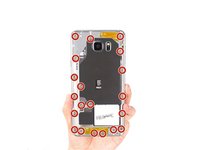
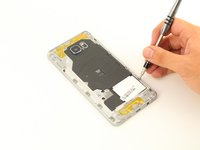
      • Remove 20 5mm screws with a Phillips #1 Screwdriver.

      댓글 쓰기

    8. Samsung Galaxy Note5 Volume Button Replacement: 10 단계, 이미지 2개 중 1개 Samsung Galaxy Note5 Volume Button Replacement: 10 단계, 이미지 2개 중 2개
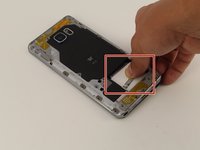
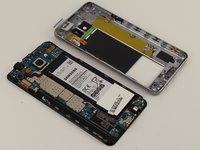
      • Grip the back of the device and press down on the white square to remove the middle housing.

      댓글 쓰기

    9. Samsung Galaxy Note5 Volume Button Replacement: 11 단계, 이미지 2개 중 1개 Samsung Galaxy Note5 Volume Button Replacement: 11 단계, 이미지 2개 중 2개
      이 단계에 사용된 도구:
      Tweezers
      $4.99
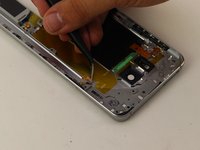
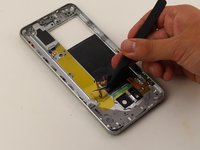
      • Loosen the power button flex adhesive by holding it with the tweezers.

      • With the tweezers, pry up and remove the power button flex

      댓글 쓰기

    10. Samsung Galaxy Note5 Volume Button Replacement: 12 단계, 이미지 1개 중 1개
      • Push out the power button with the tip of the tweezers.

      댓글 쓰기

    1. Samsung Galaxy Note5 Volume Button Replacement, Volume Button: 13 단계, 이미지 2개 중 1개 Samsung Galaxy Note5 Volume Button Replacement, Volume Button: 13 단계, 이미지 2개 중 2개
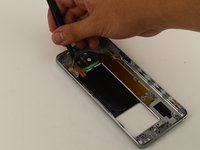
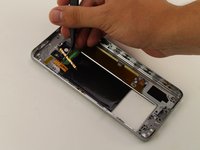
      • Loosen the volume flex adhesive.

      • Pry up and remove the volume button flex.

      댓글 쓰기

    2. Samsung Galaxy Note5 Volume Button Replacement: 14 단계, 이미지 1개 중 1개
      • Push out the volume button and remove it from the device.

      댓글 쓰기

결론

To reassemble your device, follow these instructions in reverse order.

취소: 해당 안내서를 완성하지 않았습니다.

다른 3명이 해당 안내서를 완성하였습니다.

작성자

2다른 기여자 명과 함께

Bernice Nunez

회원 가입일: 04/19/18

388 평판

안내서 2개를 작성함

Cal Poly, Team S25-G17, Maness Spring 2018 Cal Poly, Team S25-G17, Maness Spring 2018 회원

CPSU-MANESS-S18S25G17

4 회원들

안내서 46개를 작성함

0가이드 댓글

댓글 쓰기

조회 통계:

지난 24시간: 1

지난 7일: 5

지난 30일: 29

전체 시간: 1,698