주요 콘텐츠로 건너뛰기
수리 커뮤니티 가입 - 계정 만들기

Samsung Refrigerator Control Panel Replacement

필요한 것

    1. Samsung Refrigerator Control Panel Replacement, Unplug your refrigerator: 1 단계, 이미지 1개 중 1개
      • Unplug your refrigerator before you begin your repair.

      • If you are testing or repairing the following items, you may also need to shut off and disconnect the water supply:

      • Condenser fan motor

      • Compressor motor and thermal overload device

      • Water supply valve assembly

      댓글 쓰기

    1. Samsung Refrigerator Control Panel Replacement, Open the refrigerator doors: 2 단계, 이미지 2개 중 1개 Samsung Refrigerator Control Panel Replacement, Open the refrigerator doors: 2 단계, 이미지 2개 중 2개
      • Open both French doors for the refrigerator compartment.

      댓글 쓰기

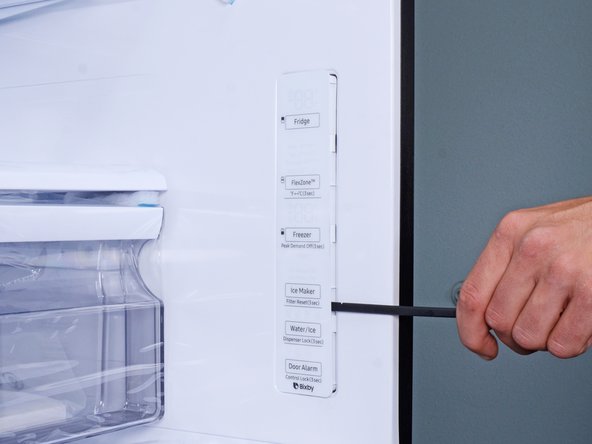
    1. Samsung Refrigerator Control Panel Replacement, Loosen the control panel: 3 단계, 이미지 3개 중 1개 Samsung Refrigerator Control Panel Replacement, Loosen the control panel: 3 단계, 이미지 3개 중 2개 Samsung Refrigerator Control Panel Replacement, Loosen the control panel: 3 단계, 이미지 3개 중 3개
      • The control panel has plastic clips around its perimeter that secure it to the refrigerator wall.

      • Insert a spudger into the seam along the right edge of the control panel.

      • You can also use a flathead screwdriver, but be careful not to let the screwdriver slip, or you'll scratch your refrigerator surface.

      • Press the spudger in firmly and pry to loosen the panel.

      • Use your spudger to slide and pry around the control panel to loosen it from the refrigerator wall.

      댓글 쓰기

    2. Samsung Refrigerator Control Panel Replacement: 4 단계, 이미지 1개 중 1개
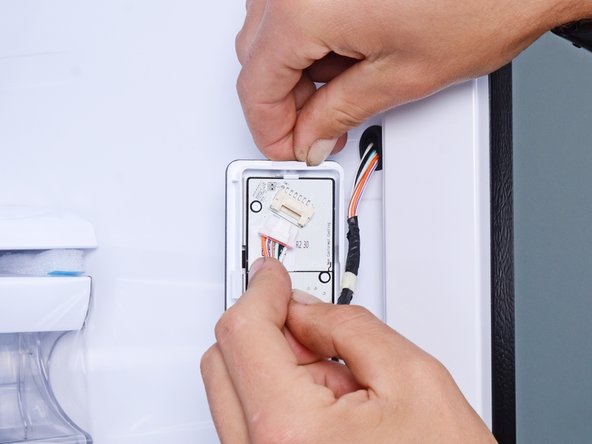
      • Flip the control panel over to reveal the cable connector.

      댓글 쓰기

    3. Samsung Refrigerator Control Panel Replacement: 5 단계, 이미지 2개 중 1개 Samsung Refrigerator Control Panel Replacement: 5 단계, 이미지 2개 중 2개
      • Use your fingers to slide the cable connector out of its socket.

      댓글 쓰기

    4. Samsung Refrigerator Control Panel Replacement, Remove the control panel: 6 단계, 이미지 1개 중 1개
      • Remove the control panel.

      댓글 쓰기

결론

To reassemble your device, follow these instructions in reverse order.

Take your e-waste to an R2 or e-Stewards certified recycler.

Repair didn’t go as planned? Ask our Answers Community for help.

취소: 해당 안내서를 완성하지 않았습니다.

작성자

1다른 기여자 명과 함께

nicO

회원 가입일: 04/14/15

15,990 평판

안내서 89개를 작성함

Team Vulcan Team Vulcan 회원

Staff

6 회원들

안내서 898개를 작성함

0가이드 댓글

댓글 쓰기

조회 통계:

지난 24시간: 12

지난 7일: 74

지난 30일: 279

전체 시간: 4,814