주요 콘텐츠로 건너뛰기
수리 커뮤니티 가입 - 계정 만들기

Samsung ST76 Motherboard Replacement

필요한 것

  1. Samsung ST76 Motherboard Replacement, Back Panel: 1 단계, 이미지 3개 중 1개 Samsung ST76 Motherboard Replacement, Back Panel: 1 단계, 이미지 3개 중 2개 Samsung ST76 Motherboard Replacement, Back Panel: 1 단계, 이미지 3개 중 3개
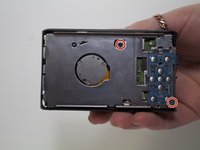
    • Use a Phillips head screwdriver to remove 5 screws from the camera. There are 2 4mm screws on the left side, 2 2mm screws on the right side and 1 4mm screw on the bottom.

    • Do not mix the 5 screws; they are different sizes.

    댓글 쓰기

  2. Samsung ST76 Motherboard Replacement: 2 단계, 이미지 2개 중 1개 Samsung ST76 Motherboard Replacement: 2 단계, 이미지 2개 중 2개
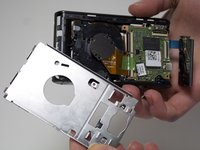
    • Use your fingers to pull the back cover off.

    댓글 쓰기

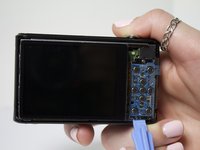
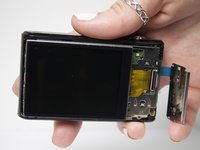
  3. Samsung ST76 Motherboard Replacement, Screen: 3 단계, 이미지 2개 중 1개 Samsung ST76 Motherboard Replacement, Screen: 3 단계, 이미지 2개 중 2개
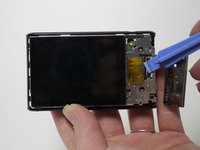
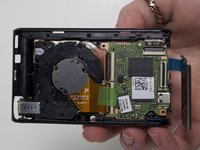
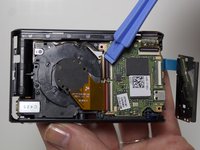
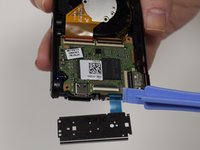
    • Separate the button panel to reveal the port holding the screen on.

    • Use a plastic opening tool to help with this task.

    댓글 쓰기

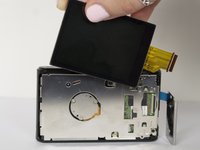
  4. Samsung ST76 Motherboard Replacement: 4 단계, 이미지 2개 중 1개 Samsung ST76 Motherboard Replacement: 4 단계, 이미지 2개 중 2개
    • Remove the yellow cable by pulling gently upwards, away from the inside of the camera, until it separates from its port.

    댓글 쓰기

  5. Samsung ST76 Motherboard Replacement, Motherboard: 5 단계, 이미지 3개 중 1개 Samsung ST76 Motherboard Replacement, Motherboard: 5 단계, 이미지 3개 중 2개 Samsung ST76 Motherboard Replacement, Motherboard: 5 단계, 이미지 3개 중 3개
    • Remove 2 3mm screws from the metal plate covering the motherboard and lens using a Phillips #00 screw driver.

    댓글 쓰기

  6. Samsung ST76 Motherboard Replacement: 6 단계, 이미지 3개 중 1개 Samsung ST76 Motherboard Replacement: 6 단계, 이미지 3개 중 2개 Samsung ST76 Motherboard Replacement: 6 단계, 이미지 3개 중 3개
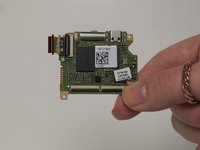
    • Remove the 4 cables connecting the motherboard to the camera body.

    • Use a plastic opening tool to help with this task.

    댓글 쓰기

결론

To reassemble your device, follow these instructions in reverse order.

취소: 해당 안내서를 완성하지 않았습니다.

다른 2명이 해당 안내서를 완성하였습니다.

작성자

3다른 기여자 명과 함께

Jessica Bain

회원 가입일: 03/11/15

408 평판

안내서 2개를 작성함

Marist, Team 1-6, Laflen Spring 2015 Marist, Team 1-6, Laflen Spring 2015 회원

MARS-LAFLEN-S15S1G6

2 회원들

안내서 8개를 작성함

3가이드 댓글

Thanks for great info. I should add that one can also clean the sensor. Sensor is circular plate with 3 screws at back of the lens. Now the camera is like new!

compand - 답글 공유

Where can you buy a replacement motherboard?

Demaree Wiitala - 답글 공유

ST76 and ST77 are very close relatives.

As it can be seen on the parts, some are marked: ”ST77”

Paul

Paul Cohen - 답글 공유

댓글 쓰기

조회 통계:

지난 24시간: 1

지난 7일: 6

지난 30일: 45

전체 시간: 1,787