주요 콘텐츠로 건너뛰기
수리 커뮤니티 가입 - 계정 만들기

Samsung T139 Camera Lens Replacement

필요한 것

  1. Samsung T139 Camera Lens Replacement, Remove Back Cover: 1 단계, 이미지 3개 중 1개 Samsung T139 Camera Lens Replacement, Remove Back Cover: 1 단계, 이미지 3개 중 2개 Samsung T139 Camera Lens Replacement, Remove Back Cover: 1 단계, 이미지 3개 중 3개
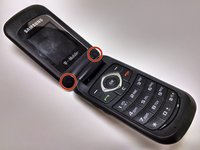
    • Power off your phone before beginning disassembly

    • Apply pressure to the back cover and slide towards the base

  2. Samsung T139 Camera Lens Replacement, Remove Battery: 2 단계, 이미지 2개 중 1개 Samsung T139 Camera Lens Replacement, Remove Battery: 2 단계, 이미지 2개 중 2개
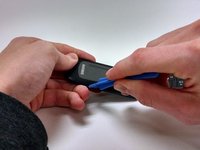
    • With a plastic opening tool, lift and remove the battery

  3. Samsung T139 Camera Lens Replacement, Remove Screw Stickers: 3 단계, 이미지 2개 중 1개 Samsung T139 Camera Lens Replacement, Remove Screw Stickers: 3 단계, 이미지 2개 중 2개
    이 단계에 사용된 도구:
    Tweezers
    $4.99
    • Using the tweezers, remove the two rubber soles that cover the panel screws

  4. Samsung T139 Camera Lens Replacement, Remove Screws: 4 단계, 이미지 2개 중 1개 Samsung T139 Camera Lens Replacement, Remove Screws: 4 단계, 이미지 2개 중 2개
    • Remove two Phillips 1.0mm #0 screws

  5. Samsung T139 Camera Lens Replacement, Remove Face Plate: 5 단계, 이미지 3개 중 1개 Samsung T139 Camera Lens Replacement, Remove Face Plate: 5 단계, 이미지 3개 중 2개 Samsung T139 Camera Lens Replacement, Remove Face Plate: 5 단계, 이미지 3개 중 3개
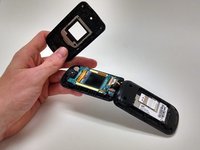
    • With the plastic opening tool, work around the face plate until it pops off

  6. Samsung T139 Camera Lens Replacement, Remove Camera Lens: 6 단계, 이미지 2개 중 1개 Samsung T139 Camera Lens Replacement, Remove Camera Lens: 6 단계, 이미지 2개 중 2개
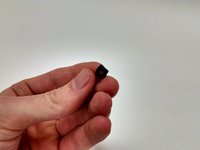
    • Apply pressure to the lens, pushing it out the back

결론

To reassemble your device, follow these instructions in reverse order.

다른 2명이 해당 안내서를 완성하였습니다.

작성자

4다른 기여자 명과 함께

Reagan May

회원 가입일: 10/23/14

573 평판

안내서 5개를 작성함

Michigan Tech, Team 1-1, Lauer Fall 2014 Michigan Tech, Team 1-1, Lauer Fall 2014 회원

MTU-LAUER-F14S1G1

3 회원들

안내서 9개를 작성함

0가이드 댓글

댓글 쓰기

조회 통계:

지난 24시간: 0

지난 7일: 4

지난 30일: 7

전체 시간: 303