주요 콘텐츠로 건너뛰기
수리 커뮤니티 가입 - 계정 만들기

Shure SM58 Capsule Installation Replacement

필요한 것

  1. Shure SM58 Capsule Installation Replacement, Collar: 1 단계, 이미지 3개 중 1개 Shure SM58 Capsule Installation Replacement, Collar: 1 단계, 이미지 3개 중 2개 Shure SM58 Capsule Installation Replacement, Collar: 1 단계, 이미지 3개 중 3개
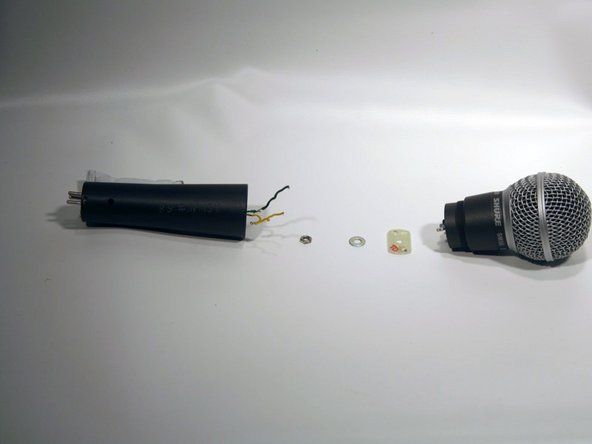
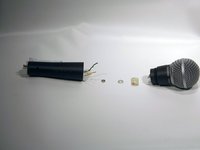
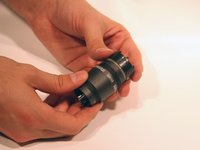
    • Grab the microphone base with one hand. With the other hand, grab just below the grille (the collar). Twist the collar clockwise to loosen it.

    • Be careful to not pull on the collar or you may rip the wires from the faceplate.

    댓글 쓰기

  2. Shure SM58 Capsule Installation Replacement, Faceplate: 2 단계, 이미지 1개 중 1개
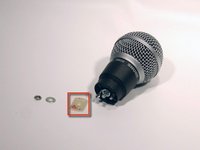
    • Remove the yellow and green wires from the face plate.

    • Note which side the yellow and green wires connect to.

    댓글 쓰기

  3. Shure SM58 Capsule Installation Replacement: 3 단계, 이미지 2개 중 1개 Shure SM58 Capsule Installation Replacement: 3 단계, 이미지 2개 중 2개
    • Never open the microphone capsule. Attempting to open the capsule will likely result in permanent damage and make the microphone unusable.

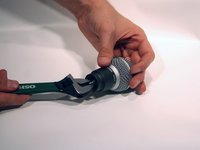
    • Using an adjustable crescent wrench, remove the nut and washer from the face plate by twisting the nut counterclockwise.

    댓글 쓰기

  4. Shure SM58 Capsule Installation Replacement: 4 단계, 이미지 2개 중 1개 Shure SM58 Capsule Installation Replacement: 4 단계, 이미지 2개 중 2개
    • Slide the face plate over the connector.

    댓글 쓰기

  5. Shure SM58 Capsule Installation Replacement, Capsule Installation: 5 단계, 이미지 2개 중 1개 Shure SM58 Capsule Installation Replacement, Capsule Installation: 5 단계, 이미지 2개 중 2개
    • Using an adjustable wrench, remove the nut and the washer behind the face plate by twisting the nut counterclockwise.

    댓글 쓰기

  6. Shure SM58 Capsule Installation Replacement: 6 단계, 이미지 1개 중 1개
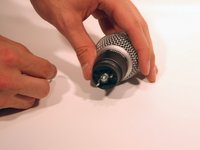
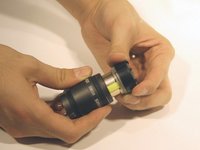
    • Hold the body of the microphone, right below the grille, in one hand. Using your other hand, rotate the grille clockwise.

    댓글 쓰기

  7. Shure SM58 Capsule Installation Replacement: 7 단계, 이미지 1개 중 1개
    • Slide the grille off the top of the microphone once it is all the way loosened.

    댓글 쓰기

  8. Shure SM58 Capsule Installation Replacement: 8 단계, 이미지 3개 중 1개 Shure SM58 Capsule Installation Replacement: 8 단계, 이미지 3개 중 2개 Shure SM58 Capsule Installation Replacement: 8 단계, 이미지 3개 중 3개
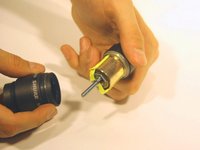
    • Hold the black plastic piece under the grille in one hand. In the other hand, hold the microphone collar.

    • Slowly, pull upward while twisting the black plastic piece clockwise.

    • Be careful not to scratch the copper microphone capsule. Another face plate may fall out when removing capsule.

    • Never open the microphone capsule. Attempting to repair the capsule will result in permanent damage.

    댓글 쓰기

결론

Once installed, reassemble the microphone following the steps in reverse.

취소: 해당 안내서를 완성하지 않았습니다.

다른 9명이 해당 안내서를 완성하였습니다.

작성자

6다른 기여자 명과 함께

nat coll

회원 가입일: 09/27/12

859 평판

안내서 14개를 작성함

Cal Poly, Team 7-53, Forte Fall 2012 Cal Poly, Team 7-53, Forte Fall 2012 회원

CPSU-FORTE-F12S7G53

5 회원들

안내서 33개를 작성함

5가이드 댓글

Thanks for that,

Can i just replace the capsule as seen in the last picture?

Has it to be resoldered? Where do those very fine copper wires go?

Eanoid - 답글 공유

It's been a few years since I made the guide and no longer have any microphones nearby to examen, but if I remember correctly, there is no soldering between the capsule and the housing. I believe the housing is soldered to the rest of the body with the silver leads at the bottom left of the picture.

Daniel Berger - 답글 공유

Somehow the grill got really stuck and I want to replace it. It it screwed or is it as you've said - slidable?

arnold - 답글 공유

You can unscrew just the grill.

Burke McQuinn - 답글 공유

Hi, a bit unrelated but I accidentally twisted the black plastic piece slightly while everything was still intact. I turned it back though, did I damage the SM58 in any way?

Emje De - 답글 공유

댓글 쓰기

조회 통계:

지난 24시간: 9

지난 7일: 77

지난 30일: 279

전체 시간: 45,054