주요 콘텐츠로 건너뛰기
수리 커뮤니티 가입 - 계정 만들기

Sony Alpha NEX-6 Lens Mount Replacement

필요한 것

  1. Sony Alpha NEX-6 Lens Mount Replacement, Finding the Release Button: 1 단계, 이미지 1개 중 1개
    • Turn the camera with the lens facing up.

    • Find the lens release button - located along the side of the silver lens mount.

  2. Sony Alpha NEX-6 Lens Mount Replacement, Removing the Lens: 2 단계, 이미지 2개 중 1개 Sony Alpha NEX-6 Lens Mount Replacement, Removing the Lens: 2 단계, 이미지 2개 중 2개
    • Press and hold the lens release button while rotating the lens counterclockwise.

    • Lift the lens when it is no longer attached to the camera.

    • To replace the lens, align the white dot on the lens with the white dot located on the silver lens mount. (See image two)

    • Insert the lens and rotate it clockwise until it is locked in place.

  3. Sony Alpha NEX-6 Lens Mount Replacement, Lens Mount: 3 단계, 이미지 1개 중 1개
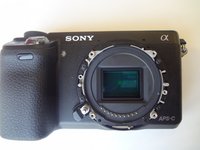
    • While dealing with this guide, do not touch the delicate image sensor (the center rectangle encircled by the lens mount).

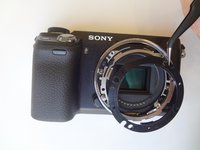
    • After removing the lens, you will come into contact with the lens mount. Start by unscrewing the four 3.5 mm Phillips #00 screws.

    • The outer lens mount ring can now be removed.

  4. Sony Alpha NEX-6 Lens Mount Replacement: 4 단계, 이미지 3개 중 1개 Sony Alpha NEX-6 Lens Mount Replacement: 4 단계, 이미지 3개 중 2개 Sony Alpha NEX-6 Lens Mount Replacement: 4 단계, 이미지 3개 중 3개
    이 단계에 사용된 도구:
    Tweezers
    $4.99
    • Pay attention to the positioning of the spacer rings for reassembly.

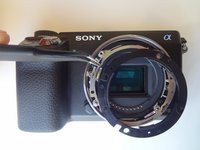
    • For the first (black) spacer ring, use the tweezers to gently pry the ring out of place.

    • Repeat this step for the second (silver) spacer ring.

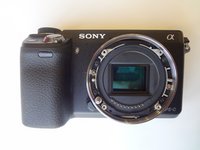
    • The third image is what the camera should look like after all spacer rings are removed.

  5. Sony Alpha NEX-6 Lens Mount Replacement: 5 단계, 이미지 2개 중 1개 Sony Alpha NEX-6 Lens Mount Replacement: 5 단계, 이미지 2개 중 2개
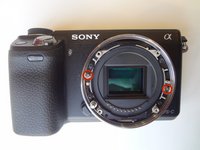
    • To remove the inner lens mount ring, remove the two silver 2.0 mm Phillips #00 screws. This will complete the removal of the lens mount.

결론

To reassemble your device, follow these instructions in reverse order.

다른 3명이 해당 안내서를 완성하였습니다.

작성자

4다른 기여자 명과 함께

Clayton Dale

회원 가입일: 01/20/15

1,067 평판

안내서 7개를 작성함

USF Tampa, Team 11-2, Blackwell Winter 2015 USF Tampa, Team 11-2, Blackwell Winter 2015 회원

USFT-BLACKWELL-W15S11G2

4 회원들

안내서 14개를 작성함

0가이드 댓글

댓글 쓰기

조회 통계:

지난 24시간: 0

지난 7일: 3

지난 30일: 14

전체 시간: 1,932