주요 콘텐츠로 건너뛰기
수리 커뮤니티 가입 - 계정 만들기

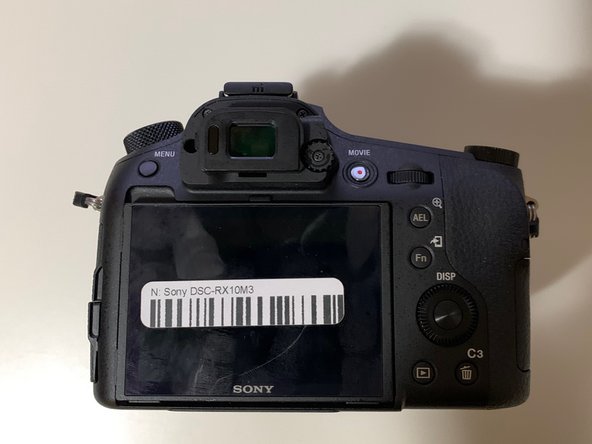
Sony DSC-RX10M3 Back and Right Panel Replacement

필요한 것

  1. Sony DSC-RX10M3 Back and Right Panel Replacement, Battery Replacement: 1 단계, 이미지 1개 중 1개
    • Turn off the Device by scrolling the tab to "OFF" indicated by the arrow.

    댓글 쓰기

  2. Sony DSC-RX10M3 Back and Right Panel Replacement: 2 단계, 이미지 3개 중 1개 Sony DSC-RX10M3 Back and Right Panel Replacement: 2 단계, 이미지 3개 중 2개 Sony DSC-RX10M3 Back and Right Panel Replacement: 2 단계, 이미지 3개 중 3개
    • Remove the battery located at the bottom of the device.

    댓글 쓰기

  3. Sony DSC-RX10M3 Back and Right Panel Replacement, Back and Right Panel: 3 단계, 이미지 1개 중 1개
    • Remove the twelve 0.7mm Phillips #000 screws from the bottom case.

    댓글 쓰기

  4. Sony DSC-RX10M3 Back and Right Panel Replacement: 4 단계, 이미지 2개 중 1개 Sony DSC-RX10M3 Back and Right Panel Replacement: 4 단계, 이미지 2개 중 2개
    • Remove the two 0.7mm screws that secure the right side of the camera.

    • Remove the two 0.7mm screws that secure the left side of the camera, near the Wi-Fi logo and charging port.

    댓글 쓰기

  5. Sony DSC-RX10M3 Back and Right Panel Replacement: 5 단계, 이미지 2개 중 1개 Sony DSC-RX10M3 Back and Right Panel Replacement: 5 단계, 이미지 2개 중 2개
    • Gently pull off the plastic eye guard.

    댓글 쓰기

  6. Sony DSC-RX10M3 Back and Right Panel Replacement: 6 단계, 이미지 2개 중 1개 Sony DSC-RX10M3 Back and Right Panel Replacement: 6 단계, 이미지 2개 중 2개
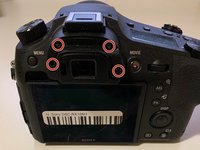
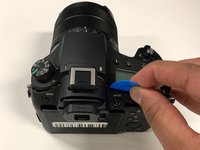
    • Use a Phillips #000 screwdriver to remove the four 0.4mm screws located under the rubber eye guard.

    • Use a plastic opening tool to detach the back panel of the camera.

    댓글 쓰기

  7. Sony DSC-RX10M3 Back and Right Panel Replacement: 7 단계, 이미지 1개 중 1개
    이 단계에 사용된 도구:
    Tweezers
    $4.99
    • This is a tight spot; make sure you use minimal force when removing the cover.

    • Using tweezers, disconnect the ribbon cable connecting the LCD to the circuit board.

    댓글 쓰기

  8. Sony DSC-RX10M3 Back and Right Panel Replacement: 8 단계, 이미지 1개 중 1개
    • This step is only needed if you wish to remove the right side panel.

    • Use a plastic openeing tool to gently detach the right panel.

    댓글 쓰기

결론

To reassemble your device, follow these instructions in reverse order.

취소: 해당 안내서를 완성하지 않았습니다.

다른 3명이 해당 안내서를 완성하였습니다.

작성자

4다른 기여자 명과 함께

Salman Hersi

회원 가입일: 01/14/20

339 평판

안내서 2개를 작성함

York University, Team S4-G4, Woodhouse Winter 2020 York University, Team S4-G4, Woodhouse Winter 2020 회원

YORK-WOODHOUSE-W20S4G4

3 회원들

안내서 6개를 작성함

0가이드 댓글

댓글 쓰기

조회 통계:

지난 24시간: 0

지난 7일: 11

지난 30일: 53

전체 시간: 1,875