소개
By removing the DVD drive you will be able to install a new one. You will also be able to access other components of the device that may need to be installed, including the DVD reader and button circuit board.
필요한 것
-
-
-
Remove the five #1 Phillips screws (black, 3/16") attaching the cover to the DVD player.
-
One 3/16" screw on the right side of the DVD player.
-
One 3/16" screw on the left side of the DVD player (directly opposite of other screw).
-
Three 3/16" screws on the back of the DVD player.
 FixBot에 문의하기
-
-
-
-
-
Remove the blue tape from the processing board by gently pulling upward.
-
-
-
이 단계에 사용된 도구:Tweezers$4.99
-
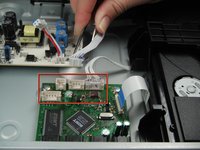
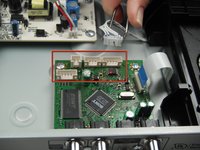
Use the tweezers to remove the four sets of wires connected to the processing board. Start with the cord located in front of the row of three cords.
-
-
-
Unscrew the two #1 Phillips screws (silver, 3/16") located on the two edge corners of the processing board.
-
-
-
Orient the DVD player so that you are facing the video and audio jacks.
-
Unscrew the two #1 Phillips screws (silver, 3/16") located on the outside of the DVD player
-
-
-
-
-
Orient the DVD player so the front of the DVD player is opposite of you.
-
Remove the two #1 Phillips screws (silver, 3/16") that attach the DVD drive to the bottom of the DVD player.
-
-
-
Remove the DVD drive by pulling it backward and upward while ensuring that it is free of any braces.
-
-




To reassemble your device, follow these instructions in reverse order.

팀

Cal Poly, Team 5-17, Forte Winter 2013 Cal Poly, Team 5-17, Forte Winter 2013 회원
CPSU-FORTE-W13S5G17
5 회원들
안내서 54개를 작성함
