소개
Use this guide to bring back to life your Ericsson W810i
In three simple steps this guide will show you how to replace your battery on your Sony Ericsson W810i.
You might use this guide when the battery on your device is either not functioning properly or you feel it does not have the capacity it did when you first received the device.
After completion of your device battery replacement. The device should power up and should operate normally.
There is no special tools or skills required.
Battery Information:
- Li-Po 900 mAh (BST-37)
- Stand-by: Up to 350 h
- Talk time: Up to 8 h
-
-
-
Place your Sony Ericsson W810I screen side down with the battery cover facing up as shown.
 FixBot에 문의하기
-
-
-
-
Remove the battery cover by applying downward pressure on the Singular Symbol and then shifting the pressure towards the bottom edge of the phone.
-
-
-
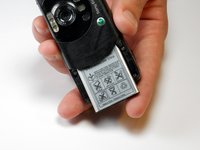
Lift the bottom of the battery away from the phone with your thumb and rotate until the opening in the bottom of the case is oriented downward. The battery should slide out.
-
-


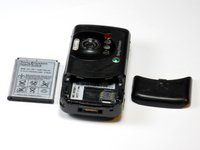
To reassemble your device, follow these instructions in reverse order.
다른 2명이 해당 안내서를 완성하였습니다.

팀

Cuesta, Team 1-7, Zipperian Fall 2011 Cuesta, Team 1-7, Zipperian Fall 2011 회원
CUESTA-ZIPPERIAN-F11S1G7
1 회원
안내서 49개를 작성함
