필요한 것
-
-
이 단계에 사용된 도구:Tweezers$4.99
-
Tools you will need is the Phillips #00 precision screwdriver, Plastic Opening Tools, and tweezers.
-
Insert plastic opening tool in the corner of device and slide along edges to separate adhesive.
-
Remove cover
 FixBot에 문의하기
-
-
-
-
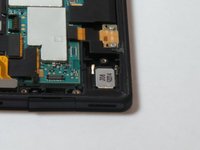
Located in the bottom left of the device you will remove the two screws holding the metal plate on the USB port.
-
Remove metal plate
-
Remove plastic securing the USB port.
-
-
-
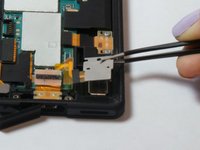
Remove screw with screw diver and lift metal plate with tweezers.
-
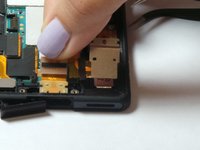
Pick up left end of the electrical tape
-
Lift up to remove USB plug from the mounting location.
-
-


To reassemble your device, follow these instructions in reverse order.
다른 30명이 해당 안내서를 완성하였습니다.

팀

USF Tampa, Team 15-6, Remmell Fall 2014 USF Tampa, Team 15-6, Remmell Fall 2014 회원
USFT-REMMELL-F14S15G6
3 회원들
안내서 7개를 작성함
14가이드 댓글
I was able to replace the usb port but my tablet still wont charge or be recognized as usb when connected to PC. What can this be? Any idea? Please I need help.
esteeizaola - 답글 공유
I also replace charging port with same result, I was not able to find a solution online so until I can find a magnetic docking station for sale I have bypassed the charging port and connected my usb direct to the battery with 100% result.
My tablet never goes outdoors so the waterproof covers is not needed, bloody well good job as there now is a usb cable poking out the cover and sealed closed with electrial type
I was able to replace my connector after much difficulty (the part I received wasn't the exact size so I had to cut a little bit and force a lot!). I worked great... For approx. 2 weeks. Now I'm back to square one. I was wondering if it would be possible to fabricate a magnetic dock (or similar), since the official one seems impossible to find?
I replaced the usb port and had the same problem as esteeizola because my battery was completely drained. (IMHO Sony has a design fault with their USB ports. They are rubish. If you get more than 200 plug/unplug operations out of a Sony USB you are very lucky).
What happened was that USB drew 4 to 5 milli-amps for about 10 to 12 amps. During this time the red led was lit but the device remained dead. Finally, USB started drawing a normally charging current (a very pathetic 300 milli-amps from what I can tell.) And the device came to life say the battery was 2% charged.
I don't what the reason is for this behavior but it certainly is very confusing and frustrating,
