주요 콘텐츠로 건너뛰기
수리 커뮤니티 가입 - 계정 만들기

Sony Xperia XZ2 Battery Replacement

필요한 것

  1. Sony Xperia XZ2 Battery Replacement, LCD Screen: 1 단계, 이미지 3개 중 1개 Sony Xperia XZ2 Battery Replacement, LCD Screen: 1 단계, 이미지 3개 중 2개 Sony Xperia XZ2 Battery Replacement, LCD Screen: 1 단계, 이미지 3개 중 3개
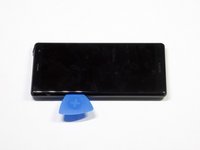
    • Weaken the glue that is keeping the screen in place by heating up the edges of the phone with a hair dryer or heat gun.

    • The phone gets very hot and can hurt the user handling it.

  2. Sony Xperia XZ2 Battery Replacement: 2 단계, 이미지 3개 중 1개 Sony Xperia XZ2 Battery Replacement: 2 단계, 이미지 3개 중 2개 Sony Xperia XZ2 Battery Replacement: 2 단계, 이미지 3개 중 3개
    • Scrape all the glue from the inside edges by inserting opening picks into the bottom edge of the phone and working your way around the edges.

    • If the glue hardens and becomes difficult to move the plastic around the edges, reheat the phone.

  3. Sony Xperia XZ2 Battery Replacement: 3 단계, 이미지 2개 중 1개 Sony Xperia XZ2 Battery Replacement: 3 단계, 이미지 2개 중 2개
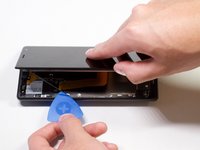
    • Pry open the phone by inserting an opening pick under one of the edges and removing the screen.

    • The screen is still attached by a connector, so do not pull the pieces apart.

  4. Sony Xperia XZ2 Battery Replacement: 4 단계, 이미지 1개 중 1개
    이 단계에 사용된 도구:
    Tweezers
    $3.99
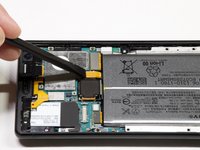
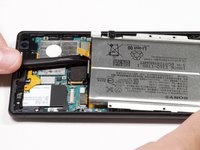
    • Remove the bracket covering the connector by grabbing one side of the bracket with angled tweezers and gently pulling it off.

  5. Sony Xperia XZ2 Battery Replacement: 5 단계, 이미지 1개 중 1개
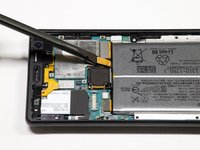
    • Gently remove the connector by using a spudger to pop it off.

  6. Sony Xperia XZ2 Battery Replacement, Battery: 6 단계, 이미지 1개 중 1개
    • Take out the twelve 3.5mm screws using the Phillips #00 screwdriver.

    • Remove the one 3 mm Phillips #00 screws.

    • Remove the two 1mm Phillips #00 screws.

    • Fifteen screws should be removed in total in this step. (Not all the screws are visible in the picture.)

  7. Sony Xperia XZ2 Battery Replacement: 7 단계, 이미지 1개 중 1개
    • Lift the metal screen shield out of the phone.

  8. Sony Xperia XZ2 Battery Replacement: 8 단계, 이미지 3개 중 1개 Sony Xperia XZ2 Battery Replacement: 8 단계, 이미지 3개 중 2개 Sony Xperia XZ2 Battery Replacement: 8 단계, 이미지 3개 중 3개
    • Use the spudger to pry up the battery flex connector to pop the battery out.

  9. Sony Xperia XZ2 Battery Replacement: 9 단계, 이미지 1개 중 1개
    • Lift the battery out of the phone.

결론

To reassemble your device, follow these instructions in reverse order.

다른 6명이 해당 안내서를 완성하였습니다.

작성자

3다른 기여자 명과 함께

Arti Jain

회원 가입일: 01/24/19

261 평판

안내서 1개를 작성함

Cal Poly, Team S19-G5, White Winter 2019 Cal Poly, Team S19-G5, White Winter 2019 회원

CPSU-WHITE-W19S19G5

4 회원들

안내서 12개를 작성함

1가이드 댓글

لقد كان العمل على هذا الهاتف مريحا جدا و جميل

Mouad Driouch - 답글

댓글 쓰기

조회 통계:

지난 24시간: 8

지난 7일: 62

지난 30일: 286

전체 시간: 31,350