주요 콘텐츠로 건너뛰기
수리 커뮤니티 가입 - 계정 만들기

SteelSeries Apex 64145 Key Replacement

필요한 것

  1. SteelSeries Apex 64145 Key Replacement, Key: 1 단계, 이미지 1개 중 1개
    • Unplug the keyboard from the computer.

  2. SteelSeries Apex 64145 Key Replacement: 2 단계, 이미지 1개 중 1개
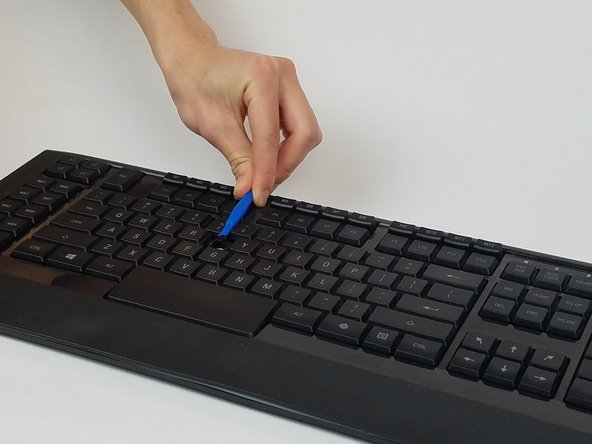
    • Insert the plastic opening tool underneath the edge of the key.

  3. SteelSeries Apex 64145 Key Replacement: 3 단계, 이미지 2개 중 1개 SteelSeries Apex 64145 Key Replacement: 3 단계, 이미지 2개 중 2개
    • Gently pry the damaged key with the plastic opening tool at an upward angle.

  4. SteelSeries Apex 64145 Key Replacement: 4 단계, 이미지 1개 중 1개
    • If replacing, prepare your new key for insertion.

    • If key is dirty, wash the key with room temperature water and dry off the key with a towel.

  5. SteelSeries Apex 64145 Key Replacement: 5 단계, 이미지 1개 중 1개
    • Gently push the key back into the slot until you hear a click.

결론

To reassemble your device, follow these instructions in reverse order.

다른 한 분이 해당 안내서를 완성하였습니다.

작성자

2다른 기여자 명과 함께

Zwe Phone Shein

회원 가입일: 02/28/17

559 평판

안내서 5개를 작성함

USF Tampa, Team S1-G1, Nance Spring 2017 USF Tampa, Team S1-G1, Nance Spring 2017 회원

USFT-NANCE-S17S1G1

4 회원들

안내서 10개를 작성함

1가이드 댓글

very easy… if u can find new keycap. those are customs not sold

T T - 답글 공유

댓글 쓰기

조회 통계:

지난 24시간: 0

지난 7일: 12

지난 30일: 38

전체 시간: 6,225