주요 콘텐츠로 건너뛰기

TRS-80 Color Computer Motherboard Replacement

필요한 것

  1. TRS-80 Color Computer Motherboard Replacement, Outside Casing: 1 단계, 이미지 1개 중 1개
    • Flip the computer over.

    • Remove the two 24.1mm Phillips screws near the front of the case.

    • Remove the five 33.0 mm Phillips screws towards the back of the case.

  2. TRS-80 Color Computer Motherboard Replacement: 2 단계, 이미지 2개 중 1개 TRS-80 Color Computer Motherboard Replacement: 2 단계, 이미지 2개 중 2개
    • Carefully flip the computer right side up.

    • Lift off the top half of the case.

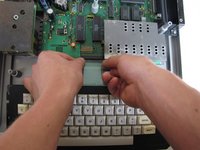
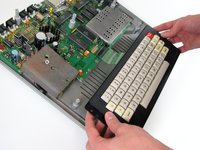
  3. TRS-80 Color Computer Motherboard Replacement, Keyboard: 3 단계, 이미지 2개 중 1개 TRS-80 Color Computer Motherboard Replacement, Keyboard: 3 단계, 이미지 2개 중 2개
    • Near the motherboard, gently pull the keyboard ribbon cable until it becomes free.

    • Lift the keyboard out of the case.

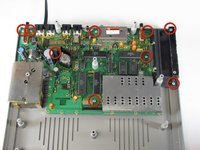
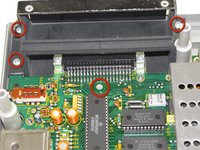
  4. TRS-80 Color Computer Motherboard Replacement, Motherboard: 4 단계, 이미지 3개 중 1개 TRS-80 Color Computer Motherboard Replacement, Motherboard: 4 단계, 이미지 3개 중 2개 TRS-80 Color Computer Motherboard Replacement, Motherboard: 4 단계, 이미지 3개 중 3개
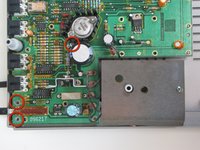
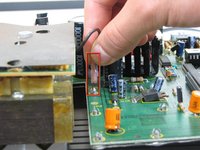
    • Remove the nine 15.24 mm Phillips screws securing the motherboard in place.

    • When removing the spring door, make sure to keep the door closed.

  5. TRS-80 Color Computer Motherboard Replacement: 5 단계, 이미지 3개 중 1개 TRS-80 Color Computer Motherboard Replacement: 5 단계, 이미지 3개 중 2개 TRS-80 Color Computer Motherboard Replacement: 5 단계, 이미지 3개 중 3개
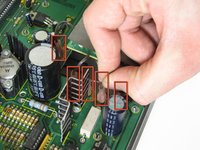
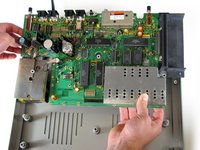
    • Remove the 5 jumper cables from the motherboard.

    • Once the jumper cables lift the motherboard up gently; it should lift out easily.

결론

To reassemble your device, follow these instructions in reverse order.

다른 5명이 해당 안내서를 완성하였습니다.

작성자

5다른 기여자 명과 함께

Andrew

회원 가입일: 01/23/11

530 평판

안내서 2개를 작성함

Cal Poly, Team 11-24, Maness Winter 2011 Cal Poly, Team 11-24, Maness Winter 2011 회원

CPSU-MANESS-W11S11G24

4 회원들

안내서 10개를 작성함

0가이드 댓글

댓글 쓰기

조회 통계:

지난 24시간: 1

지난 7일: 7

지난 30일: 16

전체 시간: 4,276