주요 콘텐츠로 건너뛰기

Teenage Engineering OP-Z Expansion Module Replacement

  1. Teenage Engineering OP-Z Expansion Module Replacement, Back Cover: 1 단계, 이미지 3개 중 1개 Teenage Engineering OP-Z Expansion Module Replacement, Back Cover: 1 단계, 이미지 3개 중 2개 Teenage Engineering OP-Z Expansion Module Replacement, Back Cover: 1 단계, 이미지 3개 중 3개
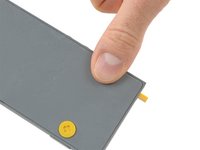
    • Unlock the four rubber feet by turning them 90° counterclockwise using your thumb or finger tip.

    • There is a tiny mark on every foot facing the bottom edge of the OP-Z. After turning them they should face towards the short edge where the on/off switch is.

  2. Teenage Engineering OP-Z Expansion Module Replacement: 2 단계, 이미지 2개 중 1개 Teenage Engineering OP-Z Expansion Module Replacement: 2 단계, 이미지 2개 중 2개
    • When turning the OP-Z over again the bottom plate should come off by itself (thanks gravity).

    • If the bottom plate won’t come off you might want to make sure every foot is rotated correctly and gently tug on one of them.

  3. Teenage Engineering OP-Z Expansion Module Replacement: 3 단계, 이미지 1개 중 1개
    • Remove the bottom plate including the rubber feet.

  4. Teenage Engineering OP-Z Expansion Module Replacement, Expansion Module: 4 단계, 이미지 2개 중 1개 Teenage Engineering OP-Z Expansion Module Replacement, Expansion Module: 4 단계, 이미지 2개 중 2개
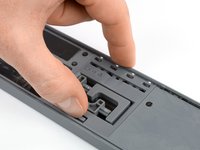
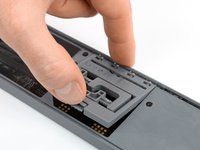
    • Use your finger or a spudger to push up on the small tab on the bottom of the module.

    • Lift the module up and out of its recess bottom first.

  5. Teenage Engineering OP-Z Expansion Module Replacement: 5 단계, 이미지 1개 중 1개
    • Remove the module.

    • When inserting another module make sure you put it in outputs first. Then push down the bottom part for the tab to engage.

결론

To reassemble your device, follow these instructions in reverse order.

작성자

1다른 기여자 명과 함께

Tobias Isakeit

회원 가입일: 03/31/14

129,283 평판

안내서 189개를 작성함

Tobias Isakeit - Repairability Engineer Tobias Isakeit - Repairability Engineer 회원

Business

1 회원

안내서 1,145개를 작성함

0가이드 댓글

댓글 쓰기

조회 통계:

지난 24시간: 0

지난 7일: 4

지난 30일: 19

전체 시간: 1,261