주요 콘텐츠로 건너뛰기

ThinkPad T420 Keyboard reinstallation Replacement

단지 전제 조건
이 가이드는 전제 조건 전용 가이드입니다! 이 가이드는 다른 절차의 일부이며 단독으로 사용할 수 없습니다.
  1. ThinkPad T420 Keyboard reinstallation Replacement, Keyboard reinstallation: 1 단계, 이미지 3개 중 1개 ThinkPad T420 Keyboard reinstallation Replacement, Keyboard reinstallation: 1 단계, 이미지 3개 중 2개 ThinkPad T420 Keyboard reinstallation Replacement, Keyboard reinstallation: 1 단계, 이미지 3개 중 3개
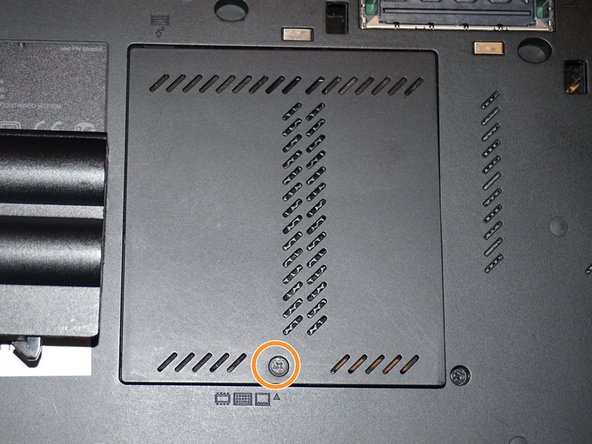
    • If you are upgrading the RAM this will be done last. Once both modules are installed, perform this step without reinstalling the screw, then reinstall the screw once the module is accepted and working.

    • Reconnect the keyboard to the motherboard. Once connected, slide the top (volume controls) in first.

    • Once the top of the keyboard is pushed in, slide the keyboard down to re-engage the lower clips until they are not visible.

    • Replace the silver screw and RAM door.

  2. ThinkPad T420 Keyboard reinstallation Replacement, Reinstall the keyboard screw: 2 단계, 이미지 3개 중 1개 ThinkPad T420 Keyboard reinstallation Replacement, Reinstall the keyboard screw: 2 단계, 이미지 3개 중 2개 ThinkPad T420 Keyboard reinstallation Replacement, Reinstall the keyboard screw: 2 단계, 이미지 3개 중 3개
    • Reinstall the keyboard screw.

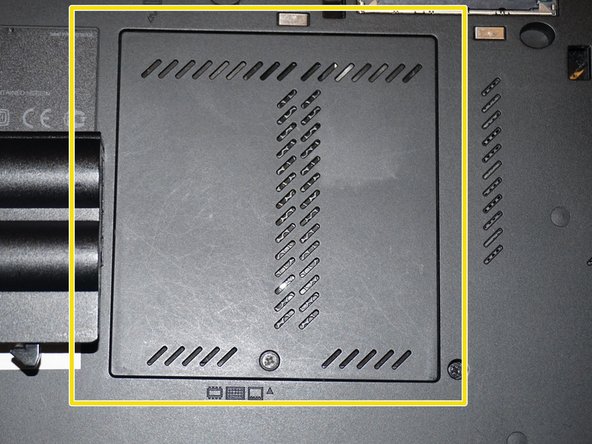
    • Reinstall the RAM door.

    • When the cover is properly reinstalled, it will be flush with the laptop.

결론

To reassemble your device, follow these instructions in reverse order.

Nick

회원 가입일: 11/10/09

98,614 평판

안내서 63개를 작성함

Master Techs Master Techs 회원

Community

329 회원들

안내서 1,451개를 작성함

0가이드 댓글

댓글 쓰기

조회 통계:

지난 24시간: 0

지난 7일: 4

지난 30일: 12

전체 시간: 181