주요 콘텐츠로 건너뛰기

Tungsten E Power Button Repair

필요한 것

  1. Tungsten E Power Button Repair, Tungsten E Disassembly: 1 단계, 이미지 2개 중 1개 Tungsten E Power Button Repair, Tungsten E Disassembly: 1 단계, 이미지 2개 중 2개
    • Remove the stylus and SD card.

    • Using a T5 torx screwdriver, remove all 4 back panel screws.

    • The screws are small and can be lost easily. Be sure to place them in a secure area.

  2. Tungsten E Power Button Repair: 2 단계, 이미지 3개 중 1개 Tungsten E Power Button Repair: 2 단계, 이미지 3개 중 2개 Tungsten E Power Button Repair: 2 단계, 이미지 3개 중 3개
    • Insert a plastic opening tool under the USB and power input slots.

    • Slide the plastic opener along the seam and gently pry the cover from the PDA body to remove the cover completely.

  3. Tungsten E Power Button Repair: 3 단계, 이미지 2개 중 1개 Tungsten E Power Button Repair: 3 단계, 이미지 2개 중 2개
    • Your device may not have a screen protector. If not, you can move on to step four.

    • Remove the screen protector by lifting the hinge out of the plastic housing.

    • Remove the top cover by gently pulling it away from the device with a plastic opening tool or your fingers.

  4. Tungsten E Power Button Repair: 4 단계, 이미지 2개 중 1개 Tungsten E Power Button Repair: 4 단계, 이미지 2개 중 2개
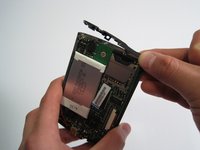
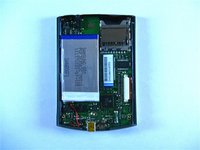
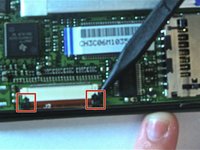
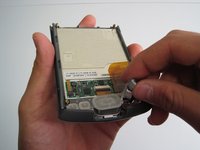
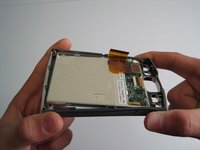
    • Carefully remove motherboard from the standoffs without damaging the LCD flex connector.

    • Using a spudger, unlock both sides of the flex connector block by pushing down.

    • Remove motherboard completely.

    • Metal washers may pop out of the device during this step

  5. Tungsten E Power Button Repair: 5 단계, 이미지 3개 중 1개 Tungsten E Power Button Repair: 5 단계, 이미지 3개 중 2개 Tungsten E Power Button Repair: 5 단계, 이미지 3개 중 3개
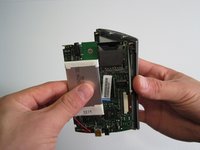
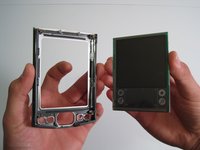
    • Remove buttons using fingers.

    • Gently flex frame to release screen from plastic frame.

    • Lift out screen.

  6. Tungsten E Power Button Repair: 6 단계, 이미지 1개 중 1개
    • Congratulations! You have successfully taken apart a Palm Tungsten E.

  7. Tungsten E Power Button Repair, Tungsten E Power Button Repair: 7 단계, 이미지 1개 중 1개
  8. Tungsten E Power Button Repair: 8 단계, 이미지 1개 중 1개
    • On the motherboard, find the power button near the upper right corner.

    • Check for disconnection of the power button.

  9. Tungsten E Power Button Repair: 9 단계, 이미지 1개 중 1개
    • Use soldering iron to reattach the damaged power button to the motherboard.

결론

To reassemble your device, follow these instructions in reverse order.

다른 한 분이 해당 안내서를 완성하였습니다.

작성자

5다른 기여자 명과 함께

Kathleen Hix

회원 가입일: 01/21/10

49 평판

안내서 2개를 작성함

Cal Poly, Team 13-22, Maness Winter 2010 Cal Poly, Team 13-22, Maness Winter 2010 회원

CPSU-MANESS-W10S13G22

4 회원들

안내서 4개를 작성함

0가이드 댓글

댓글 쓰기

조회 통계:

지난 24시간: 0

지난 7일: 3

지난 30일: 7

전체 시간: 5,322