주요 콘텐츠로 건너뛰기
수리 커뮤니티 가입 - 계정 만들기

Turtle Beach Pure Air Battery Replacement

필요한 것

  1. Turtle Beach Pure Air Battery Replacement, Bottom Cover: 1 단계, 이미지 2개 중 1개 Turtle Beach Pure Air Battery Replacement, Bottom Cover: 1 단계, 이미지 2개 중 2개
    • Power off the mouse by moving the power switch to the center.

  2. Turtle Beach Pure Air Battery Replacement: 2 단계, 이미지 2개 중 1개 Turtle Beach Pure Air Battery Replacement: 2 단계, 이미지 2개 중 2개
    • Peel back the mouse feet.

    • Remove the three 1.6mm screws using a JIS #000 screwdriver.

    • Remove the single 1.6mm screws using remove using a 1.3 mm hex screwdriver.

  3. Turtle Beach Pure Air Battery Replacement: 3 단계, 이미지 2개 중 1개 Turtle Beach Pure Air Battery Replacement: 3 단계, 이미지 2개 중 2개
    • Carefully remove the bottom cover of the mouse.

    • Be cautious of the cable connecting the bottom cover to the rest of the mouse.

  4. Turtle Beach Pure Air Battery Replacement: 4 단계, 이미지 3개 중 1개 Turtle Beach Pure Air Battery Replacement: 4 단계, 이미지 3개 중 2개 Turtle Beach Pure Air Battery Replacement: 4 단계, 이미지 3개 중 3개
    • Disconnect the ribbon cable securing the upper shell to the motherboard.

    • Lift the locking clip to release the cable from its connector.

  5. Turtle Beach Pure Air Battery Replacement, Motherboard: 5 단계, 이미지 3개 중 1개 Turtle Beach Pure Air Battery Replacement, Motherboard: 5 단계, 이미지 3개 중 2개 Turtle Beach Pure Air Battery Replacement, Motherboard: 5 단계, 이미지 3개 중 3개
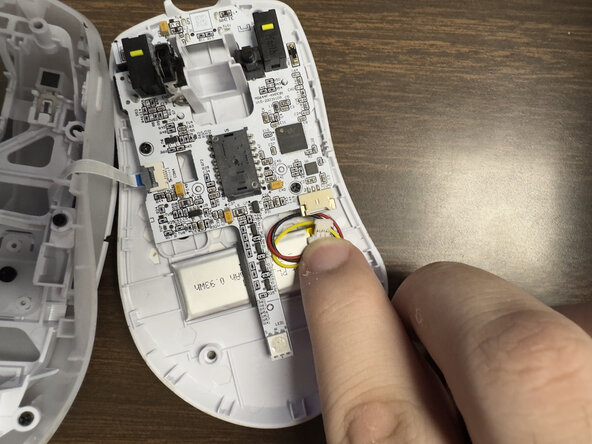
    • Carefully disconnect the battery clip from the motherboard socket by softly pulling the bottom of the clip.

  6. Turtle Beach Pure Air Battery Replacement: 6 단계, 이미지 2개 중 1개 Turtle Beach Pure Air Battery Replacement: 6 단계, 이미지 2개 중 2개
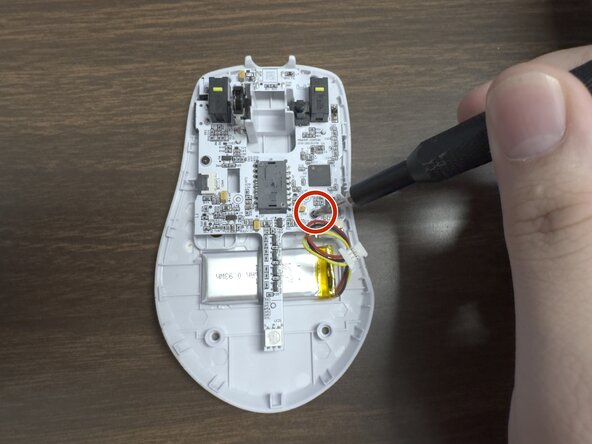
    • Remove the two 1.6 mm screws on the middle left and lower right sides with a JIS000 screwdriver to disconnect the motherboard from the lower shell.

  7. Turtle Beach Pure Air Battery Replacement: 7 단계, 이미지 2개 중 1개 Turtle Beach Pure Air Battery Replacement: 7 단계, 이미지 2개 중 2개
    • Gently lift the motherboard out of the housing.

  8. Turtle Beach Pure Air Battery Replacement, Battery: 8 단계, 이미지 3개 중 1개 Turtle Beach Pure Air Battery Replacement, Battery: 8 단계, 이미지 3개 중 2개 Turtle Beach Pure Air Battery Replacement, Battery: 8 단계, 이미지 3개 중 3개
    • Carefully pry up the battery.

    • Prying the battery may take a bit of force since it is glued to the plastic.

결론

To reassemble your device, follow these instructions in reverse order.

작성자

2다른 기여자 명과 함께

Preston Sanchez

회원 가입일: 02/03/26

291 평판

안내서 3개를 작성함

0가이드 댓글

댓글 쓰기

조회 통계:

지난 24시간: 9

지난 7일: 13

지난 30일: 16

전체 시간: 113