주요 콘텐츠로 건너뛰기
수리 커뮤니티 가입 - 계정 만들기

Turtle Beach Stealth Ultra Front Facing Buttons Replacement

필요한 것

  1. Turtle Beach Stealth Ultra Front Facing Buttons Replacement, Back Plate: 1 단계, 이미지 2개 중 1개 Turtle Beach Stealth Ultra Front Facing Buttons Replacement, Back Plate: 1 단계, 이미지 2개 중 2개
    • Use tweezers to pull out rubber pieces in front of the screws.

  2. Turtle Beach Stealth Ultra Front Facing Buttons Replacement: 2 단계, 이미지 2개 중 1개 Turtle Beach Stealth Ultra Front Facing Buttons Replacement: 2 단계, 이미지 2개 중 2개
    • Remove the 10 mm screws using a Phillips #00 screwdriver.

  3. Turtle Beach Stealth Ultra Front Facing Buttons Replacement: 3 단계, 이미지 2개 중 1개 Turtle Beach Stealth Ultra Front Facing Buttons Replacement: 3 단계, 이미지 2개 중 2개
    • Remove the sticker on the back of the plate.

    • Remove the 10 mm screws from the back plate using a Phillips #00 screwdriver.

  4. Turtle Beach Stealth Ultra Front Facing Buttons Replacement: 4 단계, 이미지 3개 중 1개 Turtle Beach Stealth Ultra Front Facing Buttons Replacement: 4 단계, 이미지 3개 중 2개 Turtle Beach Stealth Ultra Front Facing Buttons Replacement: 4 단계, 이미지 3개 중 3개
    • Use an iFixit opening tool to pry the front button plate and analog stick plate off.

    • Use a Phillips #00 screwdriver to remove the screws from the front plate on both sides of the controller.

    • Be cautious not to break the LCD screen while you move the opening tool around.

  5. Turtle Beach Stealth Ultra Front Facing Buttons Replacement: 5 단계, 이미지 3개 중 1개 Turtle Beach Stealth Ultra Front Facing Buttons Replacement: 5 단계, 이미지 3개 중 2개 Turtle Beach Stealth Ultra Front Facing Buttons Replacement: 5 단계, 이미지 3개 중 3개
    • Use an opening tool to detach the front plate from the back.

    • You may need to work the opening tool all the way around the seam between the two plates.

  6. Turtle Beach Stealth Ultra Front Facing Buttons Replacement, Motherboard: 6 단계, 이미지 2개 중 1개 Turtle Beach Stealth Ultra Front Facing Buttons Replacement, Motherboard: 6 단계, 이미지 2개 중 2개
    • Use a Phillips #00 screwdriver to remove the 10 mm screws connecting the handles to the controller frame.

  7. Turtle Beach Stealth Ultra Front Facing Buttons Replacement: 7 단계, 이미지 1개 중 1개
    • Detach the cables from the motherboard.

  8. Turtle Beach Stealth Ultra Front Facing Buttons Replacement: 8 단계, 이미지 1개 중 1개
    • Remove the yellow ribbon cable from the handle.

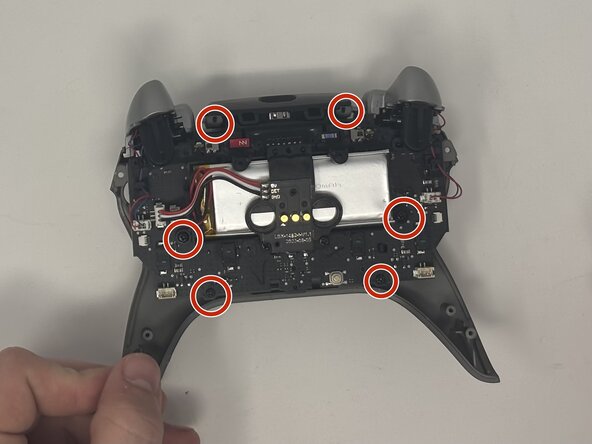
  9. Turtle Beach Stealth Ultra Front Facing Buttons Replacement: 9 단계, 이미지 2개 중 1개 Turtle Beach Stealth Ultra Front Facing Buttons Replacement: 9 단계, 이미지 2개 중 2개
    • Remove the six 10 mm screws connected to the motherboard using a Phillips #00 screwdriver.

  10. Turtle Beach Stealth Ultra Front Facing Buttons Replacement: 10 단계, 이미지 1개 중 1개
    • Gently pull the motherboard away from the frame.

  11. Turtle Beach Stealth Ultra Front Facing Buttons Replacement, Front Facing Buttons: 11 단계, 이미지 2개 중 1개 Turtle Beach Stealth Ultra Front Facing Buttons Replacement, Front Facing Buttons: 11 단계, 이미지 2개 중 2개
    • Pull the buttons out from the front plate.

결론

To reassemble your device, follow these instructions in reverse order.

다른 한 분이 해당 안내서를 완성하였습니다.

작성자

2다른 기여자 명과 함께

Dominic Dodge

회원 가입일: 09/09/25

799 평판

안내서 7개를 작성함

Utah Tech University, Team 1-7, McMurrin Fall 2025 Utah Tech University, Team 1-7, McMurrin Fall 2025 회원

UTAHTECH-MCMURRIN-F25S1G7

2 회원들

안내서 7개를 작성함

0가이드 댓글

댓글 쓰기

조회 통계:

지난 24시간: 6

지난 7일: 20

지난 30일: 77

전체 시간: 394