주요 콘텐츠로 건너뛰기

VTech MobiGo Touch Learning System Case Replacement

필요한 것

  1. VTech MobiGo Touch Learning System Case Replacement, Case: 1 단계, 이미지 1개 중 1개
    • Remove the battery covers and the four batteries.

  2. VTech MobiGo Touch Learning System Case Replacement: 2 단계, 이미지 2개 중 1개 VTech MobiGo Touch Learning System Case Replacement: 2 단계, 이미지 2개 중 2개
    • Remove the four plastic caps with a metal spudger to expose the 6.0 mm Philips JIS #0 case screws.

    • Remove the eight 6.0 mm JIS #0 case screws.

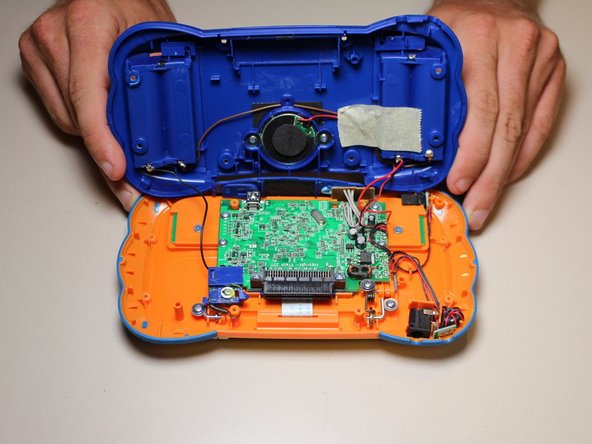
  3. VTech MobiGo Touch Learning System Case Replacement: 3 단계, 이미지 2개 중 1개 VTech MobiGo Touch Learning System Case Replacement: 3 단계, 이미지 2개 중 2개
    • Using a plastic opening tool, separate the two pieces of the case carefully.

결론

To reassemble your device, follow these instructions in reverse order.

작성자

5다른 기여자 명과 함께

Daniel Kresge

회원 가입일: 09/01/15

385 평판

안내서 4개를 작성함

USF Tampa, Team 8-3, Eyestone Fall 2015 USF Tampa, Team 8-3, Eyestone Fall 2015 회원

USFT-EYESTONE-F15S8G3

3 회원들

안내서 17개를 작성함

0가이드 댓글

댓글 쓰기

조회 통계:

지난 24시간: 0

지난 7일: 1

지난 30일: 11

전체 시간: 1,049