소개
When you can't download the game you just have to have follow this guide to replace your Wi-Fi card.
필요한 것
-
-
Push the Spudger into the crevice between the grated top panel of the Xbox and the bottom body with the rubber feet.
-
Pull back on the spudger like a lever, keeping it pressed firmly into the crevice.
 FixBot에 문의하기
-
-
-
Slide the spudger along the separation you have created between the grated panel and the bottom body of the Xbox.
-
Periodically pull back on the spudger like a lever, keeping it pressed firmly into the crevice.
-
-
-
-
Continue sliding the spudger along the perimeter of the left grated face of the Xbox.
-
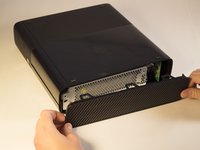
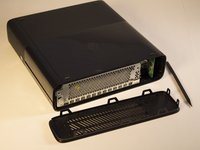
Pull the top panel off.
-
-
-
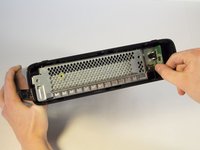
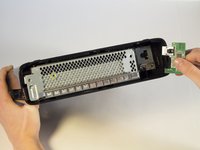
Remove the 11 mm screw left of the green wifi-card using the T9 Torx screw bit.
-




To reassemble your device, follow these instructions in reverse order.
다른 7명이 해당 안내서를 완성하였습니다.

팀

Cal Poly, Team 2-11, Amido Winter 2014 Cal Poly, Team 2-11, Amido Winter 2014 회원
CPSU-AMIDO-W14S2G11
4 회원들
안내서 44개를 작성함
