주요 콘텐츠로 건너뛰기
수리 커뮤니티 가입 - 계정 만들기

Xiaomi Air 12 Battery Replacement

필요한 것

  1. Xiaomi Air 12 Battery Replacement, Rear Casing: 1 단계, 이미지 1개 중 1개
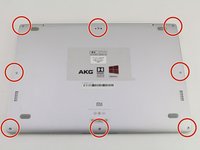
    • Orient the computer so the Xiaomi logo is at the bottom of the device.

    댓글 쓰기

  2. Xiaomi Air 12 Battery Replacement: 2 단계, 이미지 3개 중 1개 Xiaomi Air 12 Battery Replacement: 2 단계, 이미지 3개 중 2개 Xiaomi Air 12 Battery Replacement: 2 단계, 이미지 3개 중 3개
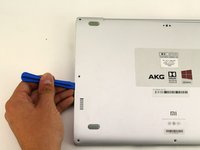
    • Insert the plastic opening tool underneath the top-middle rubber covering and lift upwards to reveal the hidden screw.

    댓글 쓰기

  3. Xiaomi Air 12 Battery Replacement: 3 단계, 이미지 2개 중 1개 Xiaomi Air 12 Battery Replacement: 3 단계, 이미지 2개 중 2개
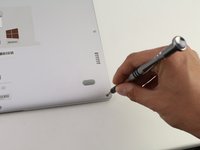
    • Remove the eight 3 mm screws using the Torx T5 driver by inserting the screwdriver into each screw and rotating counterclockwise.

    댓글 쓰기

  4. Xiaomi Air 12 Battery Replacement: 4 단계, 이미지 3개 중 1개 Xiaomi Air 12 Battery Replacement: 4 단계, 이미지 3개 중 2개 Xiaomi Air 12 Battery Replacement: 4 단계, 이미지 3개 중 3개
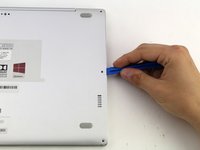
    • Insert the plastic opening tool into each side of the computer and push the tool downwards to pop open the back cover.

    • You will hear popping noises as you remove the cover.

    댓글 쓰기

  5. Xiaomi Air 12 Battery Replacement: 5 단계, 이미지 2개 중 1개 Xiaomi Air 12 Battery Replacement: 5 단계, 이미지 2개 중 2개
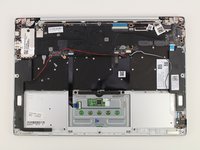
    • Remove the back of the laptop by gently lifting the casing upwards.

    댓글 쓰기

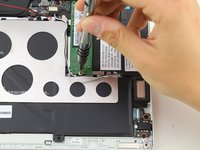
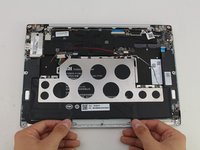
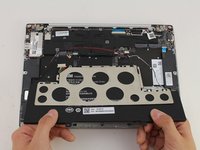
  6. Xiaomi Air 12 Battery Replacement, SSD: 6 단계, 이미지 2개 중 1개 Xiaomi Air 12 Battery Replacement, SSD: 6 단계, 이미지 2개 중 2개
    • Detach the white and black speaker wires by pulling them from the small black tabs along the perimeter of the metal bracket.

    댓글 쓰기

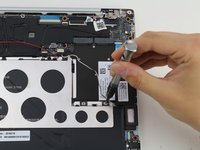
  7. Xiaomi Air 12 Battery Replacement: 7 단계, 이미지 2개 중 1개 Xiaomi Air 12 Battery Replacement: 7 단계, 이미지 2개 중 2개
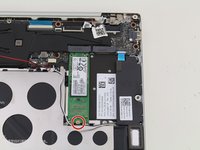
    • Remove the 1.5mm screw using the JIS #00 screwdriver.

    댓글 쓰기

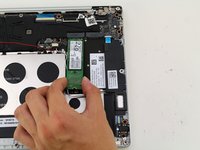
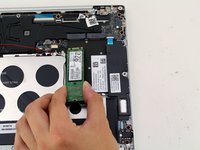
  8. Xiaomi Air 12 Battery Replacement: 8 단계, 이미지 2개 중 1개 Xiaomi Air 12 Battery Replacement: 8 단계, 이미지 2개 중 2개
    • Lift the SSD up from the device and gently pull the SSD from the laptop.

    댓글 쓰기

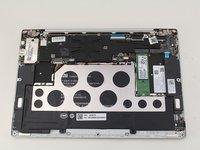
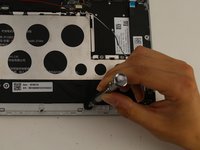
  9. Xiaomi Air 12 Battery Replacement, Battery: 9 단계, 이미지 1개 중 1개
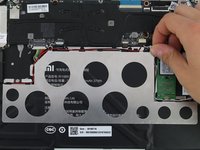
    • Detach the red wire from the tabs on the perimeter of the metal bracket.

    댓글 쓰기

  10. Xiaomi Air 12 Battery Replacement: 10 단계, 이미지 3개 중 1개 Xiaomi Air 12 Battery Replacement: 10 단계, 이미지 3개 중 2개 Xiaomi Air 12 Battery Replacement: 10 단계, 이미지 3개 중 3개
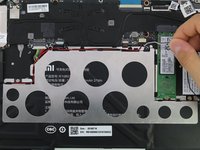
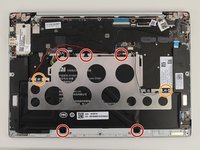
    • Use a PH1 screwdriver to remove the five 2mm black screws.

    • Remove two silver 1mm JIS #00 screws.

    • There will be clear plastic spacers that come off with the silver screws.

    댓글 쓰기

  11. Xiaomi Air 12 Battery Replacement: 11 단계, 이미지 3개 중 1개 Xiaomi Air 12 Battery Replacement: 11 단계, 이미지 3개 중 2개 Xiaomi Air 12 Battery Replacement: 11 단계, 이미지 3개 중 3개
    • Lift the battery up and pull out from the device.

    • The metal bracket will come out with the battery.

    댓글 쓰기

결론

To reassemble your device, follow these instructions in reverse order.

취소: 해당 안내서를 완성하지 않았습니다.

다른 11명이 해당 안내서를 완성하였습니다.

작성자

4다른 기여자 명과 함께

Hannah Kwan

회원 가입일: 04/18/18

928 평판

안내서 5개를 작성함

Cal Poly, Team S18-G4, Livingston Spring 2018 Cal Poly, Team S18-G4, Livingston Spring 2018 회원

CPSU-LIVINGSTON-S18S18G4

4 회원들

안내서 34개를 작성함

6가이드 댓글

I have a problem, the battery do not really charge, 100% is reach in few minutes, and it works less than 15 minutes on battery. Is anybody have a solution ? Bios update maybe ?

Migwell2 - 답글 공유
I got to pull out my bloated battery…. Though it could work with just the charger on stand by but it did not… Anyone knows where I can purchase new battery? Can't bring it to the shop because of quarantine but need to work from home.

Roma Monica Desunia - 답글 공유
I removed the bloated battery too. It can’t power on properly. The power light just just on and off around every 5 seconds. Is yours the same?

sdot - 답글 공유

after I change the battery it always says plugged in not charge, anyone has the same issue?

Anthony Jethro Lieander - 답글 공유

Hi. There is no page for keyboard replacement so I'm asking my question here: how can I find a keyboard replacement for my mi 12.5 notebook? Only two buttons do not work.

Hamed Mirrezaee - 답글 공유

댓글 쓰기

조회 통계:

지난 24시간: 5

지난 7일: 45

지난 30일: 158

전체 시간: 13,273